• #rsisb Roll NO:232 Foundation level student. Coding Task — ChatGPT Clone (Non-Functional, Web-Based, 1 hour). ## ๐Ÿ’ป Coding Task: ChatGPT Clone (Non-Functional, Web-Based) ๐Ÿค– ๐Ÿ“ Description: Today, I worked on an exciting web development project: creating a ChatGPT Clone (Non-Functional, Web-Based). ๐Ÿš€๐Ÿ’ป The goal of this one-hour coding task was to design a website inspired by ChatGPT's interface using web development technologies. During this project, I explored how to create a clean and modern user interface, design a chat layout, add message sections, and organize different elements of a chatbot website. ๐ŸŽจโŒจ๏ธ This project helped me improve my coding skills, understand website structure, and develop my creativity in web design. Although the clone is non-functional, it was a great opportunity to practice and learn how chatbot interfaces are designed. Every coding project is a new learning experience. Keep practicing, keep creating, and keep exploring technology! ๐ŸŒŸ \#๏ธโƒฃ Hashtags: \#CodingTask #ChatGPTClone #WebDevelopment #HTML #CSS #JavaScript #Coding #Programming #ArtificialIntelligence #AI #ChatbotDesign #FrontendDevelopment #WebDesign #LearningToCode #CodingPractice #TechInnovation #CreativeLearning โœจ Emojis: ๐Ÿ’ป ๐Ÿค– ๐ŸŒ โŒจ๏ธ ๐Ÿ–ฅ๏ธ ๐ŸŽจ ๐Ÿš€ ๐Ÿง  โš™๏ธ ๐Ÿ“ฑ ๐Ÿ”ฅ ๐ŸŽฏ ๐Ÿ“š ๐ŸŽงโœจ Irum Asim Leadershipwali Asma Shaheen EducationWali https://claude.ai/share/f0112994-50f9-44b7-b975-8e82a8eb5d55
    CLAUDE.AI
    Claude
    Shared via Claude, an AI assistant from Anthropic
    0 Comments 0 Shares 1718 Views
  • RSIF8
    Roll No : 87
    claude ai No : 2
    claude ai topic: Basic Calculator (arithmetic operations)
    **Basic Calculator Project – My Completed Task**
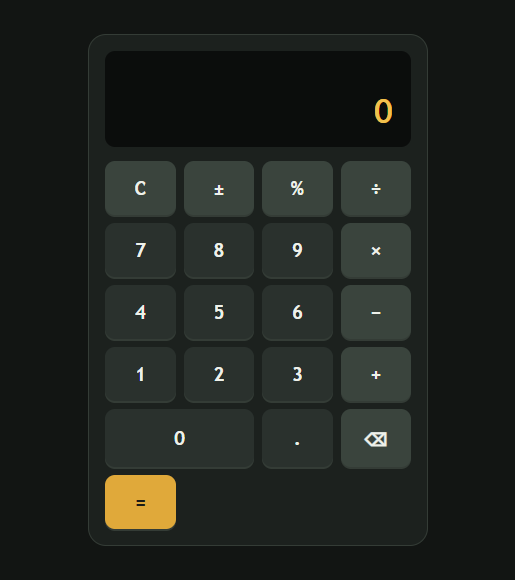
    I have successfully created a **Basic Calculator** as part of my learning and coding practice. This calculator has a simple, clean, and user-friendly interface that makes it easy to perform everyday mathematical calculations. The calculator includes important buttons such as **addition (+), subtraction (−), multiplication (×), division (÷), percentage (%), decimal (.), plus/minus (±), clear (C), and equals )**.
    The calculator display shows the numbers and results clearly, while the organized button layout makes it easy for users to enter numbers and select the required mathematical operation. I focused on making the design simple and easy to understand so that anyone can use it without difficulty.
    Creating this calculator helped me understand how a calculator works and gave me valuable practice with **HTML, CSS, and JavaScript**. I learned how to design buttons, create a calculator layout, handle user input, perform mathematical operations, and display the final result.
    This project was a great opportunity to improve my **coding, problem-solving, logical thinking, and web development skills**. I am happy to complete this project and excited to continue learning and creating more useful projects in the future.
    #BasicCalculator #Calculator #Coding #WebDevelopment #HTML #CSS #JavaScript #Programming #CodingPractice #Learning #StudentProject #ProjectCompleted #Math #Technology #ComputerSkills #ProblemSolving #ProgrammingSkills #KeepLearning #KeepGrowing
    RSIF8 Roll No : 87 claude ai No : 2 claude ai topic: Basic Calculator (arithmetic operations) ๐Ÿงฎโœจ **Basic Calculator Project – My Completed Task** โœจ๐Ÿงฎ I have successfully created a **Basic Calculator** as part of my learning and coding practice. This calculator has a simple, clean, and user-friendly interface that makes it easy to perform everyday mathematical calculations. The calculator includes important buttons such as **addition (+), subtraction (−), multiplication (×), division (÷), percentage (%), decimal (.), plus/minus (±), clear (C), and equals ๐Ÿ˜Š)**. The calculator display shows the numbers and results clearly, while the organized button layout makes it easy for users to enter numbers and select the required mathematical operation. I focused on making the design simple and easy to understand so that anyone can use it without difficulty. Creating this calculator helped me understand how a calculator works and gave me valuable practice with **HTML, CSS, and JavaScript**. I learned how to design buttons, create a calculator layout, handle user input, perform mathematical operations, and display the final result. ๐Ÿ’ป๐Ÿ“š This project was a great opportunity to improve my **coding, problem-solving, logical thinking, and web development skills**. I am happy to complete this project and excited to continue learning and creating more useful projects in the future. ๐Ÿš€๐Ÿ’ฏ #BasicCalculator #Calculator #Coding #WebDevelopment #HTML #CSS #JavaScript #Programming #CodingPractice #Learning #StudentProject #ProjectCompleted #Math #Technology #ComputerSkills #ProblemSolving #ProgrammingSkills #KeepLearning #KeepGrowing ๐Ÿงฎ๐Ÿ’ป๐Ÿš€โœจ
    0 Comments 0 Shares 3367 Views
  • RSIF8
    Roll No : 87
    claude ai No : 1
    claude ai topic: Create a Basic Calculator
    **Basic Calculator Project – My Completed Task**
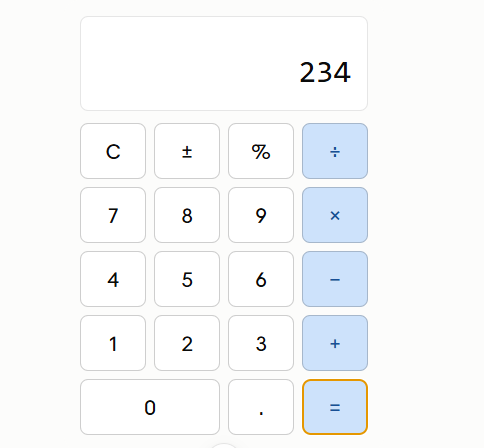
    I have successfully created a **Basic Calculator** as part of my learning and coding practice. This calculator has a simple, clean, and user-friendly interface that makes it easy to perform everyday mathematical calculations. The calculator includes important buttons such as **addition (+), subtraction (−), multiplication (×), division (÷), percentage (%), decimal (.), plus/minus (±), clear (C), and equals )**.
    The calculator display shows the numbers and results clearly, while the organized button layout makes it easy for users to enter numbers and select the required mathematical operation. I focused on making the design simple and easy to understand so that anyone can use it without difficulty.
    Creating this calculator helped me understand how a calculator works and gave me valuable practice with **HTML, CSS, and JavaScript**. I learned how to design buttons, create a calculator layout, handle user input, perform mathematical operations, and display the final result.
    This project was a great opportunity to improve my **coding, problem-solving, logical thinking, and web development skills**. I am happy to complete this project and excited to continue learning and creating more useful projects in the future.
    #BasicCalculator #Calculator #Coding #WebDevelopment #HTML #CSS #JavaScript #Programming #CodingPractice #Learning #StudentProject #ProjectCompleted #Math #Technology #ComputerSkills #ProblemSolving #ProgrammingSkills #KeepLearning #KeepGrowing
    RSIF8 Roll No : 87 claude ai No : 1 claude ai topic: Create a Basic Calculator ๐Ÿงฎโœจ **Basic Calculator Project – My Completed Task** โœจ๐Ÿงฎ I have successfully created a **Basic Calculator** as part of my learning and coding practice. This calculator has a simple, clean, and user-friendly interface that makes it easy to perform everyday mathematical calculations. The calculator includes important buttons such as **addition (+), subtraction (−), multiplication (×), division (÷), percentage (%), decimal (.), plus/minus (±), clear (C), and equals ๐Ÿ˜Š)**. The calculator display shows the numbers and results clearly, while the organized button layout makes it easy for users to enter numbers and select the required mathematical operation. I focused on making the design simple and easy to understand so that anyone can use it without difficulty. Creating this calculator helped me understand how a calculator works and gave me valuable practice with **HTML, CSS, and JavaScript**. I learned how to design buttons, create a calculator layout, handle user input, perform mathematical operations, and display the final result. ๐Ÿ’ป๐Ÿ“š This project was a great opportunity to improve my **coding, problem-solving, logical thinking, and web development skills**. I am happy to complete this project and excited to continue learning and creating more useful projects in the future. ๐Ÿš€๐Ÿ’ฏ #BasicCalculator #Calculator #Coding #WebDevelopment #HTML #CSS #JavaScript #Programming #CodingPractice #Learning #StudentProject #ProjectCompleted #Math #Technology #ComputerSkills #ProblemSolving #ProgrammingSkills #KeepLearning #KeepGrowing ๐Ÿงฎ๐Ÿ’ป๐Ÿš€โœจ
    0 Comments 0 Shares 2929 Views
  • RSIF8
    Roll No : 87
    claude ai No : 1
    claude ai topic: Create a Basic Calculator
    **Basic Calculator Project – My Completed Task**
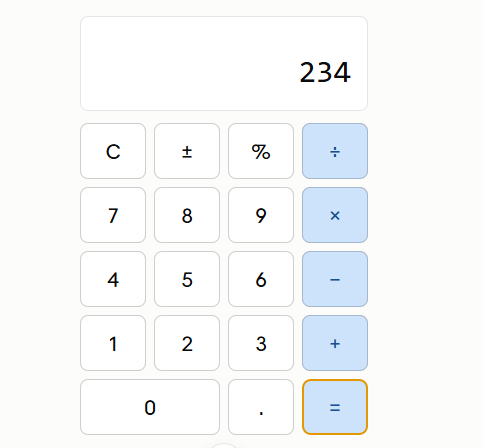
    I have successfully created a **Basic Calculator** as part of my learning and coding practice. This calculator has a simple, clean, and user-friendly interface that makes it easy to perform everyday mathematical calculations. The calculator includes important buttons such as **addition (+), subtraction (−), multiplication (×), division (÷), percentage (%), decimal (.), plus/minus (±), clear (C), and equals )**.
    The calculator display shows the numbers and results clearly, while the organized button layout makes it easy for users to enter numbers and select the required mathematical operation. I focused on making the design simple and easy to understand so that anyone can use it without difficulty.
    Creating this calculator helped me understand how a calculator works and gave me valuable practice with **HTML, CSS, and JavaScript**. I learned how to design buttons, create a calculator layout, handle user input, perform mathematical operations, and display the final result.
    This project was a great opportunity to improve my **coding, problem-solving, logical thinking, and web development skills**. I am happy to complete this project and excited to continue learning and creating more useful projects in the future.
    #BasicCalculator #Calculator #Coding #WebDevelopment #HTML #CSS #JavaScript #Programming #CodingPractice #Learning #StudentProject #ProjectCompleted #Math #Technology #ComputerSkills #ProblemSolving #ProgrammingSkills #KeepLearning #KeepGrowing
    RSIF8 Roll No : 87 claude ai No : 1 claude ai topic: Create a Basic Calculator ๐Ÿงฎโœจ **Basic Calculator Project – My Completed Task** โœจ๐Ÿงฎ I have successfully created a **Basic Calculator** as part of my learning and coding practice. This calculator has a simple, clean, and user-friendly interface that makes it easy to perform everyday mathematical calculations. The calculator includes important buttons such as **addition (+), subtraction (−), multiplication (×), division (÷), percentage (%), decimal (.), plus/minus (±), clear (C), and equals ๐Ÿ˜Š)**. The calculator display shows the numbers and results clearly, while the organized button layout makes it easy for users to enter numbers and select the required mathematical operation. I focused on making the design simple and easy to understand so that anyone can use it without difficulty. Creating this calculator helped me understand how a calculator works and gave me valuable practice with **HTML, CSS, and JavaScript**. I learned how to design buttons, create a calculator layout, handle user input, perform mathematical operations, and display the final result. ๐Ÿ’ป๐Ÿ“š This project was a great opportunity to improve my **coding, problem-solving, logical thinking, and web development skills**. I am happy to complete this project and excited to continue learning and creating more useful projects in the future. ๐Ÿš€๐Ÿ’ฏ #BasicCalculator #Calculator #Coding #WebDevelopment #HTML #CSS #JavaScript #Programming #CodingPractice #Learning #StudentProject #ProjectCompleted #Math #Technology #ComputerSkills #ProblemSolving #ProgrammingSkills #KeepLearning #KeepGrowing ๐Ÿงฎ๐Ÿ’ป๐Ÿš€โœจ
    0 Comments 0 Shares 4336 Views
  • #rsisb
    Roll No.240
    Foundation Level
    Create a Basic Calculator
    Coding Tsak No.1

    **Create a Basic Calculator | Step-by-Step Tutorial**

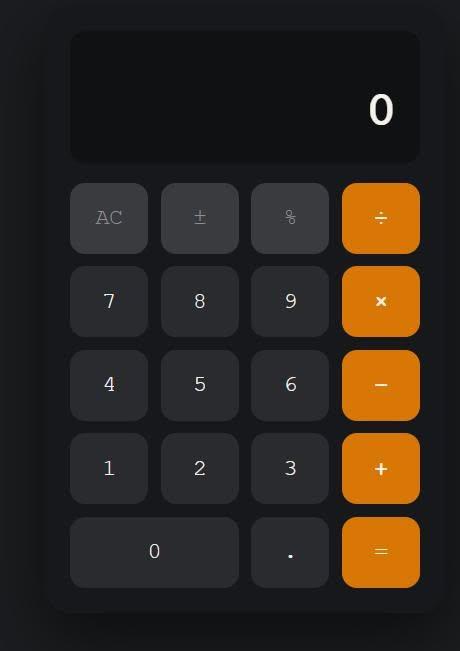
    In this video, you'll learn how to create a **basic calculator** from scratch in a simple and beginner-friendly way. Whether you're just starting your programming journey or want to practice your coding skills, this tutorial will guide you through each step clearly.

    You'll learn how to perform basic arithmetic operations such as **addition, subtraction, multiplication, and division**, while understanding the logic behind how a calculator works. This project is perfect for beginners and a great way to strengthen your programming fundamentals.

    If you enjoy this tutorial, don't forget to **Like , Share , and Subscribe ** for more easy coding lessons and beginner-friendly programming projects.

    #BasicCalculator #Programming #CodingForBeginners #LearnToCode #CodingTutorial #BeginnerProjects #TechSkills #SoftwareDevelopment #Education #CodingPractice

    Rehan School Islamabad Campus
    Asma Shaheen EducationWali
    Irum Asim
    Saima Happinesswali

    #rsisb Roll No.240 Foundation Level Create a Basic Calculator Coding Tsak No.1 ๐Ÿงฎ **Create a Basic Calculator | Step-by-Step Tutorial** In this video, you'll learn how to create a **basic calculator** from scratch in a simple and beginner-friendly way. Whether you're just starting your programming journey or want to practice your coding skills, this tutorial will guide you through each step clearly. You'll learn how to perform basic arithmetic operations such as **addition, subtraction, multiplication, and division**, while understanding the logic behind how a calculator works. This project is perfect for beginners and a great way to strengthen your programming fundamentals. If you enjoy this tutorial, don't forget to **Like ๐Ÿ‘, Share ๐Ÿ“ค, and Subscribe ๐Ÿ””** for more easy coding lessons and beginner-friendly programming projects. #BasicCalculator ๐Ÿงฎ #Programming ๐Ÿ’ป #CodingForBeginners ๐Ÿš€ #LearnToCode ๐Ÿ“š #CodingTutorial ๐ŸŽฏ #BeginnerProjects ๐ŸŒŸ #TechSkills ๐Ÿ’ก #SoftwareDevelopment ๐Ÿ”ฅ #Education ๐ŸŽ“ #CodingPractice โœจ Rehan School Islamabad Campus Asma Shaheen EducationWali Irum Asim Saima Happinesswali
    0 Comments 0 Shares 3571 Views