• RSIF8
    Roll NO:11
    Coding 2
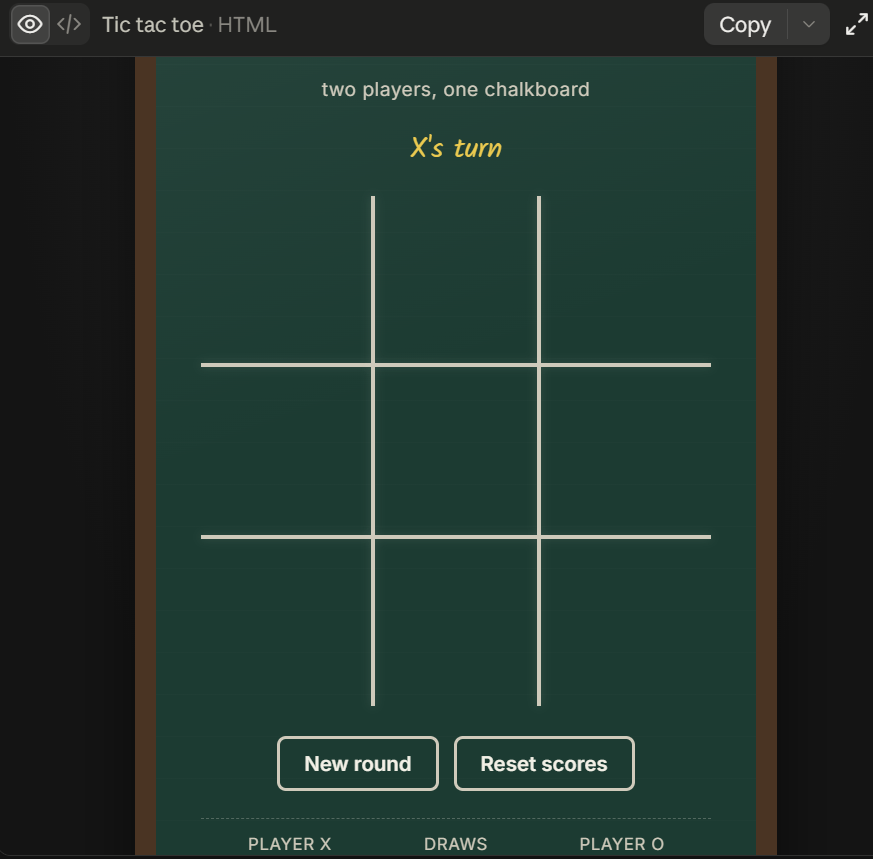
    coding topic Complete a small coding challenge Create aTic-Tac-Toe Game**: Develop a two-player tic-tactoe game that can be played in the console.
    Post a screenshot with a short explanation.

    Tic-Tac-Toe Coding Challenge Completed!

    I successfully created a two-player Tic-Tac-Toe game that runs in the console. The game allows two players to take turns placing their marks on a 3×3 grid until one player wins or the match ends in a draw.

    Through this project, I practiced important programming concepts such as variables, loops, conditional statements, user input, and game logic. This challenge helped me improve my problem-solving skills and gain hands-on experience in developing an interactive game.

    The screenshot shows the game in action, demonstrating player turns, board updates, and the final result. Building this project was both fun and educational, and it strengthened my confidence in coding.

    #CodingChallenge
    #TicTacToe
    #Programming
    #GameDevelopment
    #PythonCoding
    #ProblemSolving
    #CodingSkills
    #LearningByDoing
    #TechSkills
    #FutureProgrammer
    #ConsoleGame
    #RehanSchool
    RSIF8 Roll NO:11 Coding 2 coding topic Complete a small coding challenge Create aTic-Tac-Toe Game**: Develop a two-player tic-tactoe game that can be played in the console. Post a screenshot with a short explanation. ๐ŸŽฎโœจ Tic-Tac-Toe Coding Challenge Completed! โœจ๐ŸŽฎ I successfully created a two-player Tic-Tac-Toe game that runs in the console. ๐Ÿ–ฅ๏ธโŒโญ• The game allows two players to take turns placing their marks on a 3×3 grid until one player wins or the match ends in a draw. ๐Ÿ†๐ŸŽฏ Through this project, I practiced important programming concepts such as variables, loops, conditional statements, user input, and game logic. ๐Ÿ’ป๐Ÿš€ This challenge helped me improve my problem-solving skills and gain hands-on experience in developing an interactive game. The screenshot shows the game in action, demonstrating player turns, board updates, and the final result. ๐Ÿ“ธ๐ŸŽฎ Building this project was both fun and educational, and it strengthened my confidence in coding. ๐ŸŒŸ๐Ÿ’ก #CodingChallenge ๐Ÿ’ป #TicTacToe ๐ŸŽฎ #Programming ๐Ÿš€ #GameDevelopment ๐Ÿ•น๏ธ #PythonCoding ๐Ÿ #ProblemSolving ๐Ÿง  #CodingSkills ๐Ÿ’ก #LearningByDoing ๐Ÿ“š #TechSkills ๐ŸŒ #FutureProgrammer ๐Ÿ‘จ‍๐Ÿ’ป๐Ÿ‘ฉ‍๐Ÿ’ป #ConsoleGame ๐ŸŽฏ #RehanSchool โค๏ธโœจ
    0 Commenti 0 condivisioni 595 Views
  • RSIF8
    Roll No: 112
    Coding Post No:1
    Coding Post Topic: Basic Calculator
    ### My Basic Calculator Project
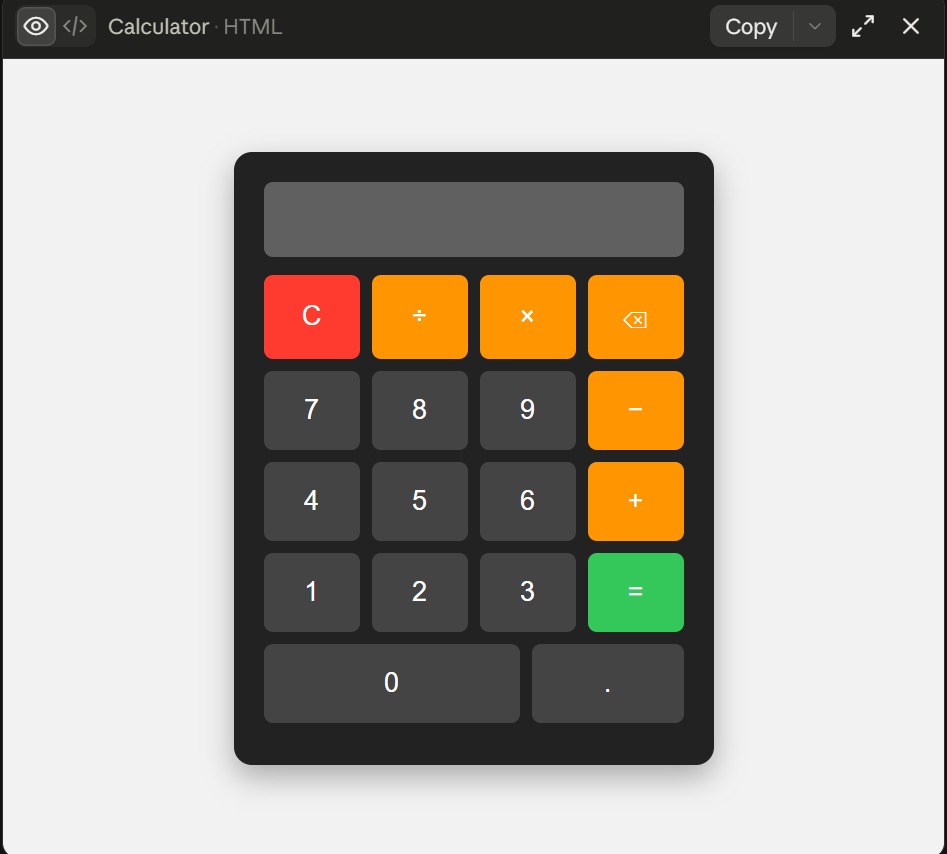
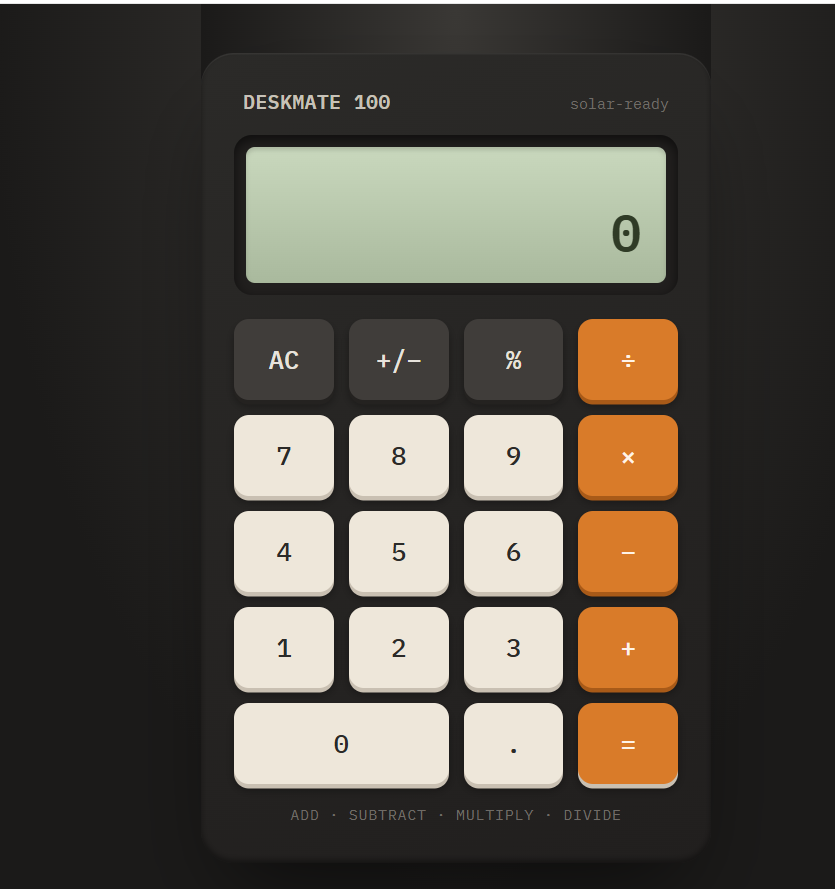
    I created a **Basic Calculator** that performs four fundamental mathematical operations: **Addition , Subtraction , Multiplication , and Division **.
    The purpose of this project was to practice programming concepts by creating a simple and useful calculator. Through this activity, I learned how to take input, process calculations, use mathematical operators, and display the correct result to the user.
    The calculator allows the user to enter numbers and select the required operation. It then performs the calculation and shows the result. This project helped me understand how programming can be used to solve everyday problems in a simple and efficient way.
    ### Operations Included
    **Addition:** Adds two numbers together.
    **Subtraction:** Finds the difference between two numbers.
    **Multiplication:** Multiplies two numbers.
    **Division:** Divides one number by another.
    Creating this calculator was a great learning experience because it helped me improve my understanding of **logic, operators, user input, calculations, and programming fundamentals**.
    I’m happy to share my project and continue improving my coding skills through more practical projects. Every small project is a step toward becoming a better programmer!
    **I have also shared a screenshot of my Basic Calculator to show the project and its working.**
    ### What I Learned
    How to perform basic mathematical operations
    How to use programming operators
    How to work with user input
    How to apply logic in a simple program
    How to create a useful beginner-level project
    How practical projects can improve programming skills
    Thank you for viewing my project!
    I’m looking forward to learning more, creating new projects, and improving my technical skills.
    ### Hashtags
    #BasicCalculator #CalculatorProject #Programming #Coding #CodingJourney #LearnToCode #ProgrammingForBeginners #StudentProject #CodingSkills #TechSkills #ComputerScience #ProgrammingProject #BeginnerProject #LearningProgramming #PracticalLearning #DigitalSkills #FutureProgrammer #RSIF8 #StudentLearning #KeepLearning #LearnAndGrow
    RSIF8 Roll No: 112 Coding Post No:1 Coding Post Topic: Basic Calculator ### ๐Ÿงฎ๐Ÿ’ป My Basic Calculator Project I created a **Basic Calculator** that performs four fundamental mathematical operations: **Addition โž•, Subtraction โž–, Multiplication โœ–๏ธ, and Division โž—**. The purpose of this project was to practice programming concepts by creating a simple and useful calculator. Through this activity, I learned how to take input, process calculations, use mathematical operators, and display the correct result to the user. ๐Ÿ’ป๐Ÿ“šโœจ The calculator allows the user to enter numbers and select the required operation. It then performs the calculation and shows the result. This project helped me understand how programming can be used to solve everyday problems in a simple and efficient way. ๐Ÿš€๐Ÿง  ### ๐Ÿ”ข Operations Included โž• **Addition:** Adds two numbers together. โž– **Subtraction:** Finds the difference between two numbers. โœ–๏ธ **Multiplication:** Multiplies two numbers. โž— **Division:** Divides one number by another. Creating this calculator was a great learning experience because it helped me improve my understanding of **logic, operators, user input, calculations, and programming fundamentals**. ๐ŸŒŸ๐Ÿ’ก I’m happy to share my project and continue improving my coding skills through more practical projects. Every small project is a step toward becoming a better programmer! ๐Ÿ‘ฉ‍๐Ÿ’ป๐Ÿš€๐Ÿ“– ๐Ÿ“ธ **I have also shared a screenshot of my Basic Calculator to show the project and its working.** ### ๐ŸŒŸ What I Learned โœ… How to perform basic mathematical operations โœ… How to use programming operators โœ… How to work with user input โœ… How to apply logic in a simple program โœ… How to create a useful beginner-level project โœ… How practical projects can improve programming skills Thank you for viewing my project! ๐Ÿ™Œโœจ I’m looking forward to learning more, creating new projects, and improving my technical skills. ๐Ÿ’ป๐ŸŒฑ๐Ÿš€ ### ๐Ÿ”– Hashtags #BasicCalculator #CalculatorProject #Programming #Coding #CodingJourney #LearnToCode #ProgrammingForBeginners #StudentProject #CodingSkills #TechSkills #ComputerScience #ProgrammingProject #BeginnerProject #LearningProgramming #PracticalLearning #DigitalSkills #FutureProgrammer #RSIF8 #StudentLearning #KeepLearning #LearnAndGrow ๐Ÿงฎ โž• โž– โœ–๏ธ โž— ๐Ÿ’ป ๐Ÿ‘ฉ‍๐Ÿ’ป ๐Ÿ“š ๐Ÿง  ๐Ÿ’ก ๐ŸŒŸ ๐Ÿš€ ๐ŸŽฏ โœจ๐Ÿ™Œ
    0 Commenti 0 condivisioni 1344 Views

  • #rsisb
    roll no.247
    Foundation level
    # Simple Calculator
    **Simple Calculator – Making Everyday Math Easy!**
    A **Simple Calculator** is a useful and beginner-friendly application designed to make basic mathematical calculations quick, accurate, and convenient. Whether you are a student learning mathematics, a beginner exploring programming, or simply someone who needs to calculate numbers quickly, a calculator provides an easy way to perform everyday calculations.
    This project focuses on the fundamental arithmetic operations: **addition (+), subtraction (-), multiplication (×), and division (÷)**. Users can enter numbers, select an operation, and instantly see the result. The simple interface makes it easy to understand and use, while also demonstrating important concepts such as user input, mathematical operators, buttons, functions, and displaying results.
    Creating a Simple Calculator is also an excellent programming project for beginners. It helps learners understand how different parts of an application work together. From designing the interface to writing the calculation logic, every step provides an opportunity to develop problem-solving and programming skills.
    A calculator project can also be expanded with additional features such as decimal numbers, percentage calculations, clear and delete buttons, keyboard support, calculation history, and more advanced mathematical functions. This makes it a great starting point for learning how simple applications can gradually become more powerful and interactive.
    **Key Features:**
    Addition
    Subtraction
    Multiplication
    Division
    Easy-to-use interface
    Fast calculations
    Beginner-friendly design
    Useful for learning programming
    Clear and understandable results
    **Learning Value:**
    Working on a Simple Calculator helps learners practice logical thinking, understand basic programming concepts, handle user input, and create interactive applications. It demonstrates how mathematics and technology can come together to solve everyday problems.
    **Conclusion:**
    The Simple Calculator may be a small project, but it teaches some very important ideas about programming and application development. It is a perfect beginner project for turning basic mathematical operations into an interactive digital tool. Keep learning, keep experimenting, and keep building!
    #SimpleCalculator #Calculator #Math #Mathematics #Programming #Coding #BeginnerProject #CodingForBeginners #LearnProgramming #ComputerScience #Technology #Education #StudentProject #MathSkills #ProblemSolving #ProgrammingProject #DigitalLearning #CodingSkills #CreativeCoding #LearnToCode #TechEducation #BasicCalculator #EasyCoding #Innovation
    #rsisb roll no.247 Foundation level # Simple Calculator ๐Ÿงฎโœจ ๐Ÿงฎ **Simple Calculator – Making Everyday Math Easy!** ๐Ÿ”ข๐Ÿ’ก A **Simple Calculator** is a useful and beginner-friendly application designed to make basic mathematical calculations quick, accurate, and convenient. โž•โž–โœ–๏ธโž— Whether you are a student learning mathematics, a beginner exploring programming, or simply someone who needs to calculate numbers quickly, a calculator provides an easy way to perform everyday calculations. ๐Ÿ“š๐Ÿ’ป This project focuses on the fundamental arithmetic operations: **addition (+), subtraction (-), multiplication (×), and division (÷)**. Users can enter numbers, select an operation, and instantly see the result. โšก๐Ÿ”ข The simple interface makes it easy to understand and use, while also demonstrating important concepts such as user input, mathematical operators, buttons, functions, and displaying results. ๐ŸŽฏ Creating a Simple Calculator is also an excellent programming project for beginners. ๐Ÿ‘จ‍๐Ÿ’ป๐Ÿ‘ฉ‍๐Ÿ’ป It helps learners understand how different parts of an application work together. From designing the interface to writing the calculation logic, every step provides an opportunity to develop problem-solving and programming skills. ๐Ÿš€๐Ÿง  A calculator project can also be expanded with additional features such as decimal numbers, percentage calculations, clear and delete buttons, keyboard support, calculation history, and more advanced mathematical functions. ๐ŸŒŸ๐Ÿ“ฑ This makes it a great starting point for learning how simple applications can gradually become more powerful and interactive. โœจ **Key Features:** ๐Ÿ”น Addition โž• ๐Ÿ”น Subtraction โž– ๐Ÿ”น Multiplication โœ–๏ธ ๐Ÿ”น Division โž— ๐Ÿ”น Easy-to-use interface ๐Ÿ–ฅ๏ธ ๐Ÿ”น Fast calculations โšก ๐Ÿ”น Beginner-friendly design ๐ŸŒฑ ๐Ÿ”น Useful for learning programming ๐Ÿ’ป ๐Ÿ”น Clear and understandable results โœ… ๐Ÿ“š **Learning Value:** Working on a Simple Calculator helps learners practice logical thinking, understand basic programming concepts, handle user input, and create interactive applications. ๐Ÿง ๐Ÿ’ป It demonstrates how mathematics and technology can come together to solve everyday problems. ๐ŸŒŸ **Conclusion:** The Simple Calculator may be a small project, but it teaches some very important ideas about programming and application development. ๐Ÿงฎ๐Ÿš€ It is a perfect beginner project for turning basic mathematical operations into an interactive digital tool. Keep learning, keep experimenting, and keep building! ๐Ÿ’ก๐ŸŒˆ #SimpleCalculator #Calculator #Math #Mathematics #Programming #Coding #BeginnerProject #CodingForBeginners #LearnProgramming #ComputerScience #Technology #Education #StudentProject #MathSkills #ProblemSolving #ProgrammingProject #DigitalLearning #CodingSkills #CreativeCoding #LearnToCode #TechEducation #BasicCalculator #EasyCoding #Innovation
    0 Commenti 0 condivisioni 3331 Views
  • Exciting Achievement Unlocked!

    I’m thrilled to share that I have successfully completed Coding Book 1 and earned my certificate!

    This journey helped me strengthen my skills in web development, problem-solving, and building practical projects using modern technologies. Throughout Coding Book 1, I worked on multiple hands-on tasks and projects that enhanced my understanding of programming concepts and real-world development.

    This achievement motivates me to continue learning, building innovative projects, and advancing my development skills through future coding challenges and projects.

    A big thank you to everyone who supported and encouraged me throughout this learning journey. More exciting projects are coming soon!

    Certificate Achieved Successfully
    Coding Book 1 Completed
    Ready for the Next Learning Journey

    #CodingBook1 #CertificateAchieved #WebDevelopment #Programming #LearningJourney #DeveloperLife #TechEducation #CodingSkills #FutureDeveloper #AchievementUnlocked #CodeWithPassion
    ๐Ÿ† Exciting Achievement Unlocked! ๐ŸŽ‰ I’m thrilled to share that I have successfully completed Coding Book 1 and earned my certificate! ๐Ÿš€ This journey helped me strengthen my skills in web development, problem-solving, and building practical projects using modern technologies. Throughout Coding Book 1, I worked on multiple hands-on tasks and projects that enhanced my understanding of programming concepts and real-world development. This achievement motivates me to continue learning, building innovative projects, and advancing my development skills through future coding challenges and projects. A big thank you to everyone who supported and encouraged me throughout this learning journey. More exciting projects are coming soon! ๐Ÿ’ปโœจ ๐Ÿ… Certificate Achieved Successfully ๐Ÿ“š Coding Book 1 Completed ๐Ÿš€ Ready for the Next Learning Journey #CodingBook1 #CertificateAchieved #WebDevelopment #Programming #LearningJourney #DeveloperLife #TechEducation #CodingSkills #FutureDeveloper #AchievementUnlocked #CodeWithPassion ๐Ÿš€๐Ÿ†๐Ÿ’ป๐ŸŽ‰
    0 Commenti 0 condivisioni 2747 Views