• RSIF8
    Roll no:09
    Coding Task no:01
    Coding Task topic:Complete a small coding challenge Create a Basic Calculator that performs basic arithmetic
    operations like addition, subtraction, multiplication, and division.

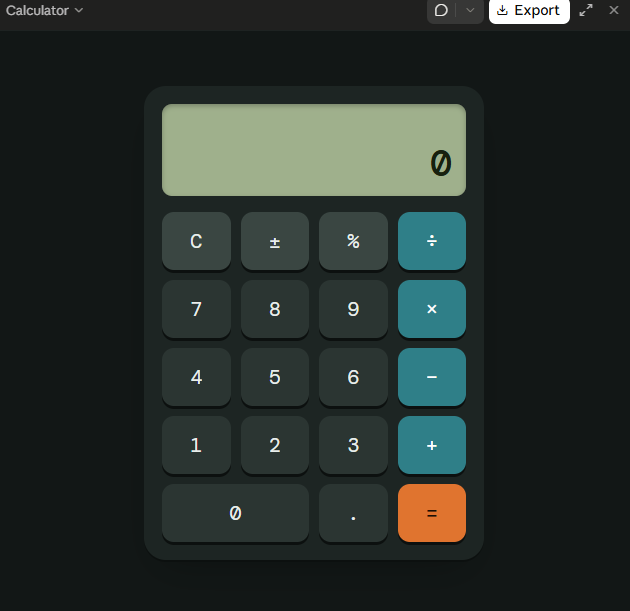
    Basic Calculator Coding Challenge Completed!

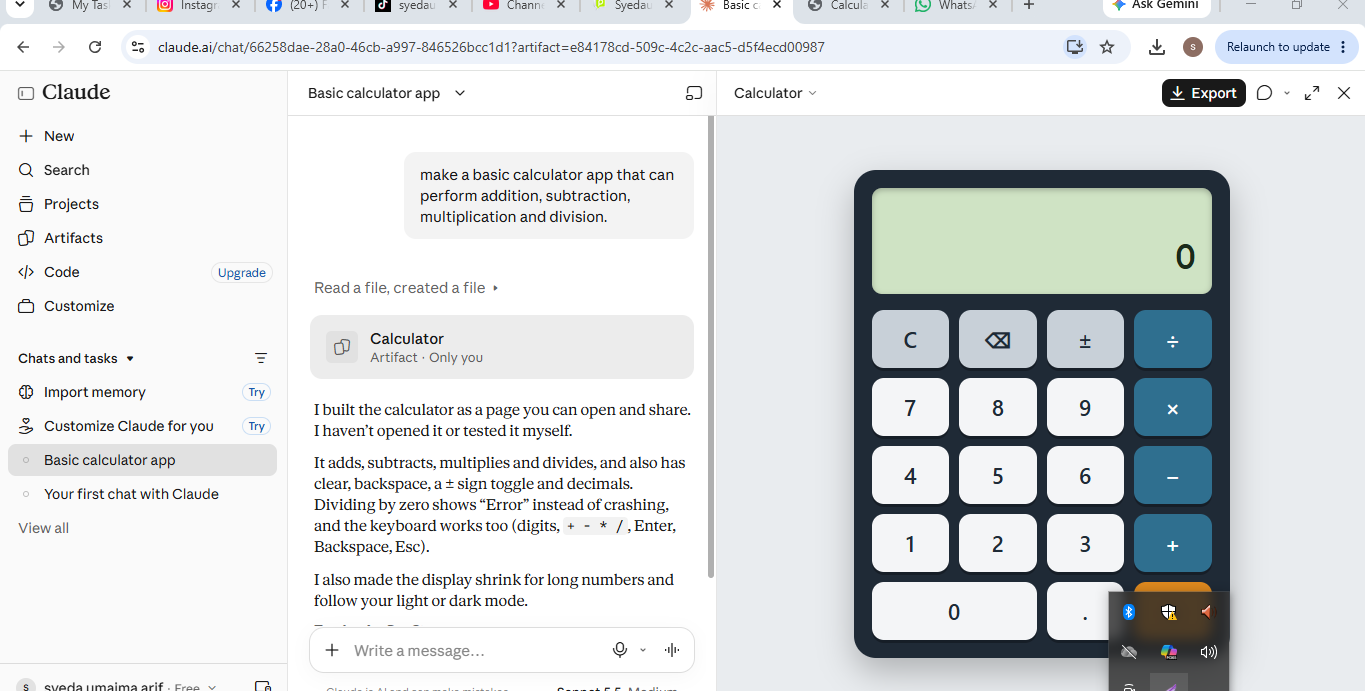
    I created a Basic Calculator that performs the four fundamental arithmetic operations:
    Addition
    Subtraction
    Multiplication
    Division

    This project helped me practice programming concepts such as user input, variables, conditional statements, and mathematical operations. It was a great way to strengthen my coding skills and understand how calculators work behind the scenes.

    Screenshot attached below.

    #CodingChallenge #BasicCalculator #Programming #Coding #Python #LearnToCode #StudentDeveloper #TechSkills #ComputerScience #CodeNewbie
    RSIF8 Roll no:09 Coding Task no:01 Coding Task topic:Complete a small coding challenge Create a Basic Calculator that performs basic arithmetic operations like addition, subtraction, multiplication, and division. 🧮 Basic Calculator Coding Challenge Completed! 🎉 I created a Basic Calculator that performs the four fundamental arithmetic operations: ➕ Addition ➖ Subtraction ✖️ Multiplication ➗ Division This project helped me practice programming concepts such as user input, variables, conditional statements, and mathematical operations. It was a great way to strengthen my coding skills and understand how calculators work behind the scenes. 📸 Screenshot attached below. #CodingChallenge #BasicCalculator #Programming #Coding #Python #LearnToCode #StudentDeveloper #TechSkills #ComputerScience #CodeNewbie 🚀💻🧮
    0 Comments 0 Shares 125 Views
  • RSIF8
    Roll No: 113
    Coding Task No: 1
    Task: Basic Calculator (Arithmetic Operations)

    Basic Calculator (Arithmetic Operations)

    For my first coding task, I created a basic calculator that performs fundamental arithmetic operations.

    The calculator can perform:

    Addition
    Subtraction
    Multiplication
    Division

    The purpose of this task was to practice basic programming concepts such as taking user input, using variables, applying arithmetic operators, and displaying results.

    Through this task, I learned how programming can be used to create a simple and useful calculator for performing everyday mathematical calculations.

    This coding task helped me strengthen my understanding of basic programming logic and arithmetic operations.

    Learn • Code • Practice • Improve

    #RSIF8 #RollNo113 #CodingTask1 #BasicCalculator #Calculator #ArithmeticOperations #Addition #Subtraction #Multiplication #Division #Coding #Programming #ProgrammingBasics #Mathematics #DigitalSkills #Learning #Education #StudentProject #LearnAndCode
    RSIF8 Roll No: 113 Coding Task No: 1 Task: Basic Calculator (Arithmetic Operations) Basic Calculator (Arithmetic Operations) For my first coding task, I created a basic calculator that performs fundamental arithmetic operations. 🧮💻 The calculator can perform: ➕ Addition ➖ Subtraction ✖️ Multiplication ➗ Division The purpose of this task was to practice basic programming concepts such as taking user input, using variables, applying arithmetic operators, and displaying results. Through this task, I learned how programming can be used to create a simple and useful calculator for performing everyday mathematical calculations. 📚🧠 💡 This coding task helped me strengthen my understanding of basic programming logic and arithmetic operations. Learn • Code • Practice • Improve 🚀✨ #RSIF8 #RollNo113 #CodingTask1 #BasicCalculator #Calculator #ArithmeticOperations #Addition #Subtraction #Multiplication #Division #Coding #Programming #ProgrammingBasics #Mathematics #DigitalSkills #Learning #Education #StudentProject #LearnAndCode
    0 Comments 0 Shares 309 Views
  • RSIF8
    Roll no 68
    Task no 103
    Task topic; **Basic Calculator with GUI**

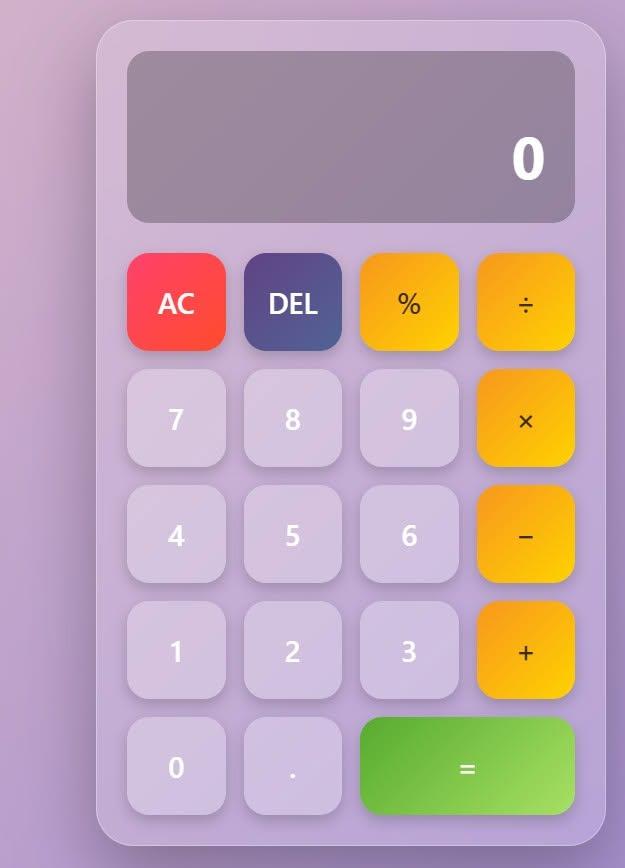
    This project is a simple **Graphical User Interface (GUI) Calculator** designed to perform basic mathematical operations such as **addition, subtraction, multiplication, and division**.

    The calculator has an easy-to-use interface with buttons for numbers, operators, clearing the display, and showing the final result. It is a great beginner-friendly project for learning **GUI design and programming logic**.
    RSIF8 Roll no 68 Task no 103 Task topic; **Basic Calculator with GUI** This project is a simple **Graphical User Interface (GUI) Calculator** designed to perform basic mathematical operations such as **addition, subtraction, multiplication, and division**. ➕➖✖️➗ The calculator has an easy-to-use interface with buttons for numbers, operators, clearing the display, and showing the final result. It is a great beginner-friendly project for learning **GUI design and programming logic**. 💻✨
    0 Comments 0 Shares 135 Views
  • RSIF8
    ROLL NO 100
    CODING TASK NO 1
    CODING TOPIC Create a Basic Calculator

    Here’s a ready-to-post description for your calculator project:

    **Create a Basic Calculator**

    In this project, I created a basic calculator that can perform essential mathematical operations such as **addition , subtraction , multiplication , and division **.

    This activity helped me practice my **coding, logical thinking, problem-solving, and programming skills**. It was a fun way to learn how simple code can be used to create a useful application!

    #BasicCalculator #Coding #Programming #ComputerScience #LearningToCode #CodingProject #ProblemSolving #LogicalThinking #StudentProject #Technology
    RSIF8 ROLL NO 100 CODING TASK NO 1 CODING TOPIC Create a Basic Calculator Here’s a ready-to-post description for your calculator project: 🧮 **Create a Basic Calculator** 💻✨ In this project, I created a basic calculator that can perform essential mathematical operations such as **addition ➕, subtraction ➖, multiplication ✖️, and division ➗**. This activity helped me practice my **coding, logical thinking, problem-solving, and programming skills**. 🚀📚 It was a fun way to learn how simple code can be used to create a useful application! 😊💡 #BasicCalculator #Coding #Programming #ComputerScience #LearningToCode #CodingProject #ProblemSolving #LogicalThinking #StudentProject #Technology 💻🧮🚀
    0 Comments 0 Shares 161 Views
  • RSIF8
    Roll NO:11
    Coding 1
    coding topic Complete a small coding challenge Create a Basic Calculator that performs basic arithmetic operations like addition, subtraction, multiplication, and division.
    Post a screenshot with a short explanation.

    Basic Calculator Coding Challenge Completed!

    I created a Basic Calculator that can perform four important arithmetic operations:

    Addition
    Subtraction
    Multiplication
    Division

    Screenshot Attached: Shows the calculator taking user input and displaying accurate results.

    Short Explanation:
    This calculator is designed to perform simple mathematical calculations. Users enter two numbers and select an operation. The program then calculates and displays the result instantly. It helps beginners understand basic programming concepts such as variables, user input, conditional statements, and arithmetic operations.

    Skills Practiced:
    User Input Handling
    Arithmetic Operations
    Conditional Statements (if/else)
    Output Display
    Problem Solving

    This project is a great way to learn the fundamentals of coding while creating a useful and interactive program.

    #CodingChallenge #Programming #BasicCalculator #LearningToCode #TechSkills #RehanSchool #FutureProgrammer #CodingJourney
    RSIF8 Roll NO:11 Coding 1 coding topic Complete a small coding challenge Create a Basic Calculator that performs basic arithmetic operations like addition, subtraction, multiplication, and division. Post a screenshot with a short explanation. 🚀✨ Basic Calculator Coding Challenge Completed! ✨🚀 💻 I created a Basic Calculator that can perform four important arithmetic operations: ➕ Addition ➖ Subtraction ✖️ Multiplication ➗ Division 📸 Screenshot Attached: Shows the calculator taking user input and displaying accurate results. 📝 Short Explanation: This calculator is designed to perform simple mathematical calculations. Users enter two numbers and select an operation. The program then calculates and displays the result instantly. It helps beginners understand basic programming concepts such as variables, user input, conditional statements, and arithmetic operations. 🌟 Skills Practiced: ✅ User Input Handling ✅ Arithmetic Operations ✅ Conditional Statements (if/else) ✅ Output Display ✅ Problem Solving 🎯 This project is a great way to learn the fundamentals of coding while creating a useful and interactive program. #CodingChallenge 💻 #Programming 🚀 #BasicCalculator ➕➖✖️➗ #LearningToCode 🌟 #TechSkills 🎯 #RehanSchool 📚 #FutureProgrammer 👨‍💻👩‍💻 #CodingJourney 🚀✨
    0 Comments 0 Shares 296 Views
  • RSIF8
    Roll no 68
    Task no 27
    Task topic; Create a Basic Calculator
    A Basic Calculator is a simple yet powerful application designed to perform everyday mathematical operations such as addition, subtraction, multiplication, and division. It provides users with an easy-to-use interface for solving calculations quickly and accurately.
    Building a calculator is an excellent project for beginners because it helps develop programming skills, logical thinking, and an understanding of user interface design. Through this project, you can learn how to handle user input, perform calculations, and display results efficiently.
    Whether you're a student learning to code or someone exploring software development, creating a basic calculator is a great way to practice and strengthen your programming fundamentals.
    Learn, build, and calculate with confidence!
    RSIF8 Roll no 68 Task no 27 Task topic; Create a Basic Calculator A Basic Calculator is a simple yet powerful application designed to perform everyday mathematical operations such as addition, subtraction, multiplication, and division. It provides users with an easy-to-use interface for solving calculations quickly and accurately. Building a calculator is an excellent project for beginners because it helps develop programming skills, logical thinking, and an understanding of user interface design. Through this project, you can learn how to handle user input, perform calculations, and display results efficiently. Whether you're a student learning to code or someone exploring software development, creating a basic calculator is a great way to practice and strengthen your programming fundamentals. 💡 Learn, build, and calculate with confidence!
    0 Comments 0 Shares 238 Views
  • #rsisb
    Roll no 279
    codig task no 1
    Foundtion level

    In this activity, you will learn how to create a simple and useful **Basic Calculator**. A calculator helps users perform common mathematical operations quickly and easily, such as **addition (+), subtraction (−), multiplication (×), and division (÷)**.
    The goal of this project is to understand how a calculator works and how buttons, numbers, and mathematical operations can be connected together. You will also learn how to create a simple user-friendly interface where users can enter numbers, select an operation, and see the final result.
    **What You Will Learn:**
    • How to create a calculator interface
    • How to use number and operation buttons
    • How to perform basic mathematical calculations
    • How to display results clearly
    • How to make a simple and easy-to-use calculator
    This project is a great beginner-friendly activity for learning **logic, problem-solving, programming, and basic user-interface design**.
    #BasicCalculator #Calculator #Programming #Coding #LearnCoding #BeginnerProject #Math #Technology #ComputerSkills #ProgrammingForBeginners #Learning #Education #CodingProject #DigitalSkills #ComputerScience
    Saima Happinesswali
    Irum Asim
    Asma Shaheen EducationWali
    #rsisb Roll no 279 codig task no 1 Foundtion level In this activity, you will learn how to create a simple and useful **Basic Calculator**. A calculator helps users perform common mathematical operations quickly and easily, such as **addition (+), subtraction (−), multiplication (×), and division (÷)**. The goal of this project is to understand how a calculator works and how buttons, numbers, and mathematical operations can be connected together. You will also learn how to create a simple user-friendly interface where users can enter numbers, select an operation, and see the final result. 💡 **What You Will Learn:** • How to create a calculator interface • How to use number and operation buttons • How to perform basic mathematical calculations • How to display results clearly • How to make a simple and easy-to-use calculator This project is a great beginner-friendly activity for learning **logic, problem-solving, programming, and basic user-interface design**. 🚀💻 #BasicCalculator #Calculator #Programming #Coding #LearnCoding #BeginnerProject #Math #Technology #ComputerSkills #ProgrammingForBeginners #Learning #Education #CodingProject #DigitalSkills #ComputerScience 🧮💻📚🚀 Saima Happinesswali Irum Asim Asma Shaheen EducationWali
    0 Comments 0 Shares 411 Views
  • RSIF8
    Roll No: 112
    Coding Post No:1
    Coding Post Topic: Basic Calculator
    ### My Basic Calculator Project
    I created a **Basic Calculator** that performs four fundamental mathematical operations: **Addition , Subtraction , Multiplication , and Division **.
    The purpose of this project was to practice programming concepts by creating a simple and useful calculator. Through this activity, I learned how to take input, process calculations, use mathematical operators, and display the correct result to the user.
    The calculator allows the user to enter numbers and select the required operation. It then performs the calculation and shows the result. This project helped me understand how programming can be used to solve everyday problems in a simple and efficient way.
    ### Operations Included
    **Addition:** Adds two numbers together.
    **Subtraction:** Finds the difference between two numbers.
    **Multiplication:** Multiplies two numbers.
    **Division:** Divides one number by another.
    Creating this calculator was a great learning experience because it helped me improve my understanding of **logic, operators, user input, calculations, and programming fundamentals**.
    I’m happy to share my project and continue improving my coding skills through more practical projects. Every small project is a step toward becoming a better programmer!
    **I have also shared a screenshot of my Basic Calculator to show the project and its working.**
    ### What I Learned
    How to perform basic mathematical operations
    How to use programming operators
    How to work with user input
    How to apply logic in a simple program
    How to create a useful beginner-level project
    How practical projects can improve programming skills
    Thank you for viewing my project!
    I’m looking forward to learning more, creating new projects, and improving my technical skills.
    ### Hashtags
    #BasicCalculator #CalculatorProject #Programming #Coding #CodingJourney #LearnToCode #ProgrammingForBeginners #StudentProject #CodingSkills #TechSkills #ComputerScience #ProgrammingProject #BeginnerProject #LearningProgramming #PracticalLearning #DigitalSkills #FutureProgrammer #RSIF8 #StudentLearning #KeepLearning #LearnAndGrow
    RSIF8 Roll No: 112 Coding Post No:1 Coding Post Topic: Basic Calculator ### 🧮💻 My Basic Calculator Project I created a **Basic Calculator** that performs four fundamental mathematical operations: **Addition ➕, Subtraction ➖, Multiplication ✖️, and Division ➗**. The purpose of this project was to practice programming concepts by creating a simple and useful calculator. Through this activity, I learned how to take input, process calculations, use mathematical operators, and display the correct result to the user. 💻📚✨ The calculator allows the user to enter numbers and select the required operation. It then performs the calculation and shows the result. This project helped me understand how programming can be used to solve everyday problems in a simple and efficient way. 🚀🧠 ### 🔢 Operations Included ➕ **Addition:** Adds two numbers together. ➖ **Subtraction:** Finds the difference between two numbers. ✖️ **Multiplication:** Multiplies two numbers. ➗ **Division:** Divides one number by another. Creating this calculator was a great learning experience because it helped me improve my understanding of **logic, operators, user input, calculations, and programming fundamentals**. 🌟💡 I’m happy to share my project and continue improving my coding skills through more practical projects. Every small project is a step toward becoming a better programmer! 👩‍💻🚀📖 📸 **I have also shared a screenshot of my Basic Calculator to show the project and its working.** ### 🌟 What I Learned ✅ How to perform basic mathematical operations ✅ How to use programming operators ✅ How to work with user input ✅ How to apply logic in a simple program ✅ How to create a useful beginner-level project ✅ How practical projects can improve programming skills Thank you for viewing my project! 🙌✨ I’m looking forward to learning more, creating new projects, and improving my technical skills. 💻🌱🚀 ### 🔖 Hashtags #BasicCalculator #CalculatorProject #Programming #Coding #CodingJourney #LearnToCode #ProgrammingForBeginners #StudentProject #CodingSkills #TechSkills #ComputerScience #ProgrammingProject #BeginnerProject #LearningProgramming #PracticalLearning #DigitalSkills #FutureProgrammer #RSIF8 #StudentLearning #KeepLearning #LearnAndGrow 🧮 ➕ ➖ ✖️ ➗ 💻 👩‍💻 📚 🧠 💡 🌟 🚀 🎯 ✨🙌
    0 Comments 0 Shares 976 Views
  • RSIF8
    Roll No : 87
    claude ai No : 1
    claude ai topic: Create a Basic Calculator
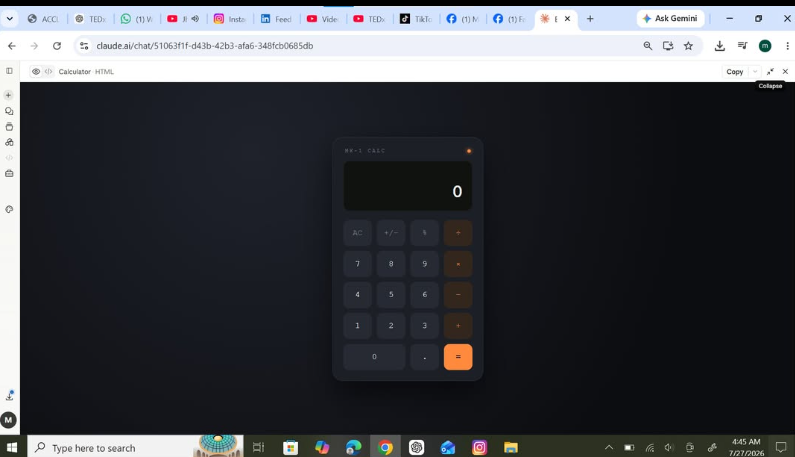
    **Basic Calculator Project – My Completed Task**
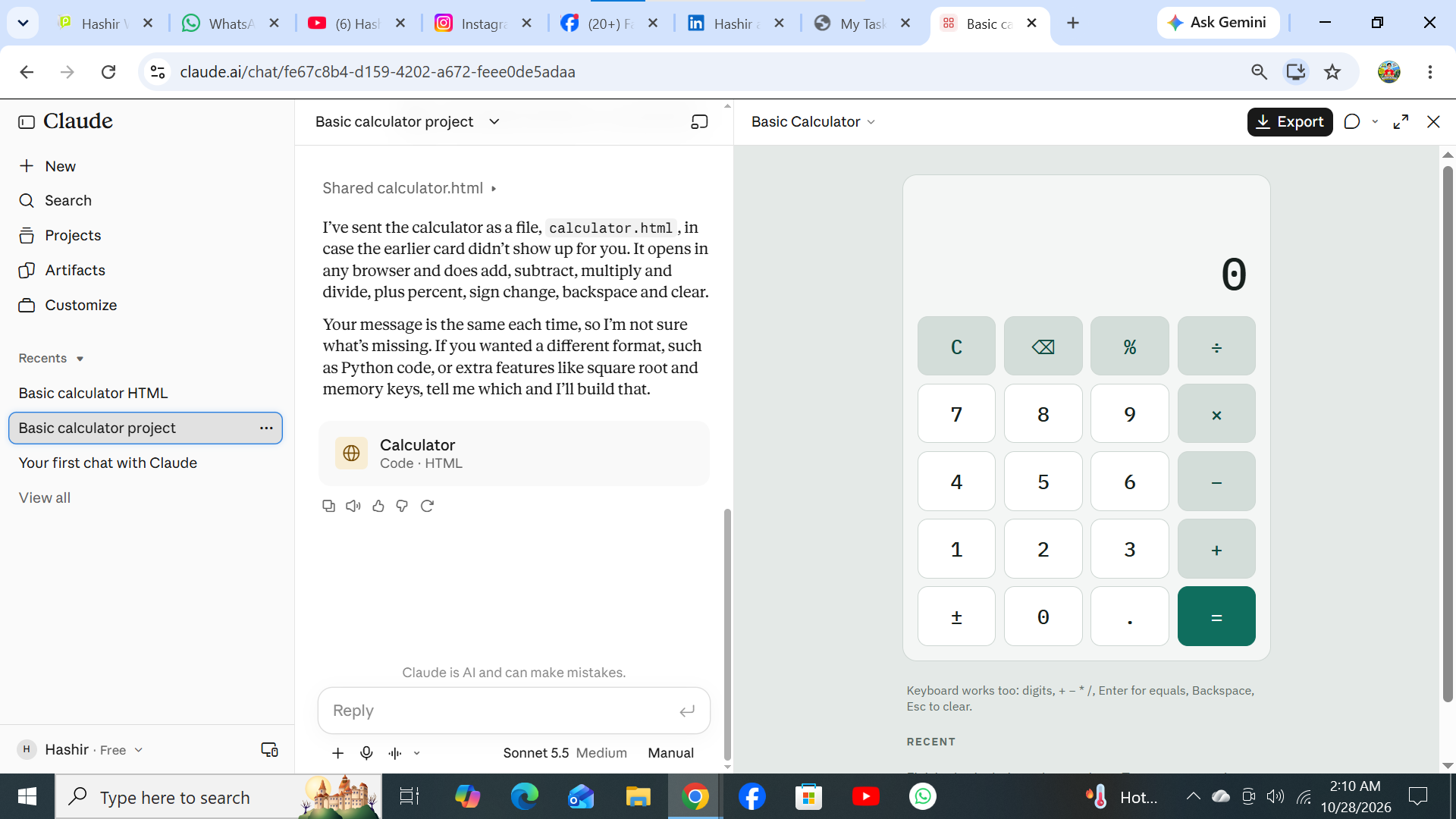
    I have successfully created a **Basic Calculator** as part of my learning and coding practice. This calculator has a simple, clean, and user-friendly interface that makes it easy to perform everyday mathematical calculations. The calculator includes important buttons such as **addition (+), subtraction (−), multiplication (×), division (÷), percentage (%), decimal (.), plus/minus (±), clear (C), and equals )**.
    The calculator display shows the numbers and results clearly, while the organized button layout makes it easy for users to enter numbers and select the required mathematical operation. I focused on making the design simple and easy to understand so that anyone can use it without difficulty.
    Creating this calculator helped me understand how a calculator works and gave me valuable practice with **HTML, CSS, and JavaScript**. I learned how to design buttons, create a calculator layout, handle user input, perform mathematical operations, and display the final result.
    This project was a great opportunity to improve my **coding, problem-solving, logical thinking, and web development skills**. I am happy to complete this project and excited to continue learning and creating more useful projects in the future.
    #BasicCalculator #Calculator #Coding #WebDevelopment #HTML #CSS #JavaScript #Programming #CodingPractice #Learning #StudentProject #ProjectCompleted #Math #Technology #ComputerSkills #ProblemSolving #ProgrammingSkills #KeepLearning #KeepGrowing
    RSIF8 Roll No : 87 claude ai No : 1 claude ai topic: Create a Basic Calculator 🧮✨ **Basic Calculator Project – My Completed Task** ✨🧮 I have successfully created a **Basic Calculator** as part of my learning and coding practice. This calculator has a simple, clean, and user-friendly interface that makes it easy to perform everyday mathematical calculations. The calculator includes important buttons such as **addition (+), subtraction (−), multiplication (×), division (÷), percentage (%), decimal (.), plus/minus (±), clear (C), and equals 😊)**. The calculator display shows the numbers and results clearly, while the organized button layout makes it easy for users to enter numbers and select the required mathematical operation. I focused on making the design simple and easy to understand so that anyone can use it without difficulty. Creating this calculator helped me understand how a calculator works and gave me valuable practice with **HTML, CSS, and JavaScript**. I learned how to design buttons, create a calculator layout, handle user input, perform mathematical operations, and display the final result. 💻📚 This project was a great opportunity to improve my **coding, problem-solving, logical thinking, and web development skills**. I am happy to complete this project and excited to continue learning and creating more useful projects in the future. 🚀💯 #BasicCalculator #Calculator #Coding #WebDevelopment #HTML #CSS #JavaScript #Programming #CodingPractice #Learning #StudentProject #ProjectCompleted #Math #Technology #ComputerSkills #ProblemSolving #ProgrammingSkills #KeepLearning #KeepGrowing 🧮💻🚀✨
    0 Comments 0 Shares 1826 Views
  • RSIF8
    Roll no: 99
    Coding task no: 1
    Coding topic Create a Basic Calculator
    Today’s task was to build a functional calculator that can perform basic mathematical operations such as:
    Addition
    Subtraction
    Multiplication
    Division
    I built the calculator using HTML, CSS, and JavaScript, with a proper interactive interface where users can enter numbers and perform calculations.
    But here’s the interesting part: I didn’t write all the code from scratch myself. Instead, I used ChatGPT for vibe coding — I described what I wanted, worked with the generated code, tested it, and made sure the final calculator actually worked.
    This task taught me that coding isn’t only about writing every line manually. It’s also about understanding the problem, communicating your idea clearly, testing the result, debugging, and learning from the code.
    One more small project completed!
    One more step forward in my learning journey.
    #VibeCoding #ChatGPT #HTML #CSS #JavaScript #WebDevelopment #Coding #Programming #Calculator #100DaysOfCode #LearningToCode #BuildInPublic #TechJourney #WebDesign #FrontendDevelopment #CodingJourney #AI #ArtificialIntelligence #Developer #StudentDeveloper
    RSIF8 Roll no: 99 Coding task no: 1 Coding topic Create a Basic Calculator Today’s task was to build a functional calculator that can perform basic mathematical operations such as: ➕ Addition ➖ Subtraction ✖️ Multiplication ➗ Division I built the calculator using HTML, CSS, and JavaScript, with a proper interactive interface where users can enter numbers and perform calculations. But here’s the interesting part: I didn’t write all the code from scratch myself. Instead, I used ChatGPT for vibe coding 🤖💻 — I described what I wanted, worked with the generated code, tested it, and made sure the final calculator actually worked. This task taught me that coding isn’t only about writing every line manually. It’s also about understanding the problem, communicating your idea clearly, testing the result, debugging, and learning from the code. One more small project completed! ✅ One more step forward in my learning journey. 📚🚀 #VibeCoding #ChatGPT #HTML #CSS #JavaScript #WebDevelopment #Coding #Programming #Calculator #100DaysOfCode #LearningToCode #BuildInPublic #TechJourney #WebDesign #FrontendDevelopment #CodingJourney #AI #ArtificialIntelligence #Developer #StudentDeveloper
    0 Comments 0 Shares 2169 Views
More Results