• RSIF8
    Roll No : 87
    claude ai No : 1
    claude ai topic: Create a Basic Calculator
    **Basic Calculator Project – My Completed Task**
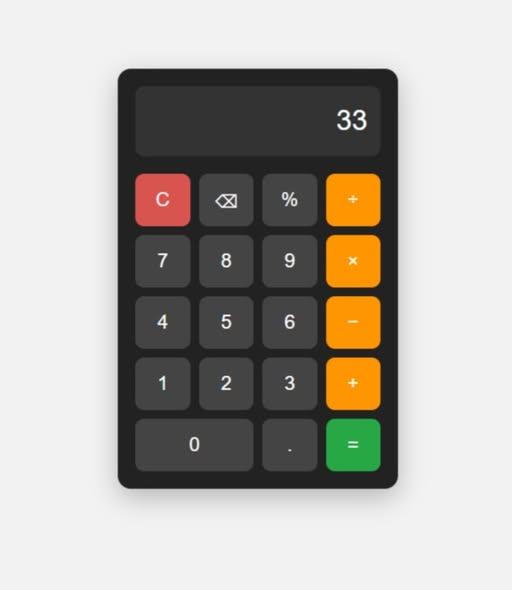
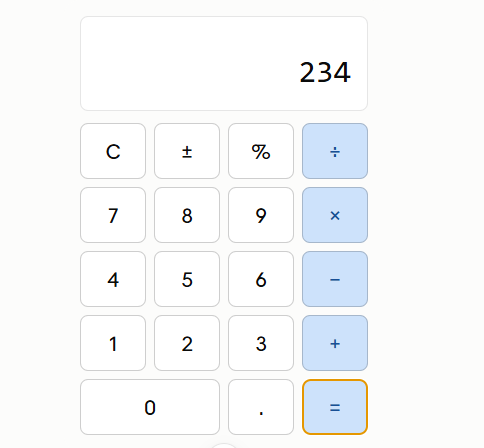
    I have successfully created a **Basic Calculator** as part of my learning and coding practice. This calculator has a simple, clean, and user-friendly interface that makes it easy to perform everyday mathematical calculations. The calculator includes important buttons such as **addition (+), subtraction (−), multiplication (×), division (÷), percentage (%), decimal (.), plus/minus (±), clear (C), and equals )**.
    The calculator display shows the numbers and results clearly, while the organized button layout makes it easy for users to enter numbers and select the required mathematical operation. I focused on making the design simple and easy to understand so that anyone can use it without difficulty.
    Creating this calculator helped me understand how a calculator works and gave me valuable practice with **HTML, CSS, and JavaScript**. I learned how to design buttons, create a calculator layout, handle user input, perform mathematical operations, and display the final result.
    This project was a great opportunity to improve my **coding, problem-solving, logical thinking, and web development skills**. I am happy to complete this project and excited to continue learning and creating more useful projects in the future.
    #BasicCalculator #Calculator #Coding #WebDevelopment #HTML #CSS #JavaScript #Programming #CodingPractice #Learning #StudentProject #ProjectCompleted #Math #Technology #ComputerSkills #ProblemSolving #ProgrammingSkills #KeepLearning #KeepGrowing
    RSIF8 Roll No : 87 claude ai No : 1 claude ai topic: Create a Basic Calculator 🧮✨ **Basic Calculator Project – My Completed Task** ✨🧮 I have successfully created a **Basic Calculator** as part of my learning and coding practice. This calculator has a simple, clean, and user-friendly interface that makes it easy to perform everyday mathematical calculations. The calculator includes important buttons such as **addition (+), subtraction (−), multiplication (×), division (÷), percentage (%), decimal (.), plus/minus (±), clear (C), and equals 😊)**. The calculator display shows the numbers and results clearly, while the organized button layout makes it easy for users to enter numbers and select the required mathematical operation. I focused on making the design simple and easy to understand so that anyone can use it without difficulty. Creating this calculator helped me understand how a calculator works and gave me valuable practice with **HTML, CSS, and JavaScript**. I learned how to design buttons, create a calculator layout, handle user input, perform mathematical operations, and display the final result. 💻📚 This project was a great opportunity to improve my **coding, problem-solving, logical thinking, and web development skills**. I am happy to complete this project and excited to continue learning and creating more useful projects in the future. 🚀💯 #BasicCalculator #Calculator #Coding #WebDevelopment #HTML #CSS #JavaScript #Programming #CodingPractice #Learning #StudentProject #ProjectCompleted #Math #Technology #ComputerSkills #ProblemSolving #ProgrammingSkills #KeepLearning #KeepGrowing 🧮💻🚀✨
    0 Comentários 0 Compartilhamentos 270 Visualizações
  • RSIF8
    Roll no: 99
    Coding task no: 2
    Coding topic: Create a Tic-Tac-Toe Game
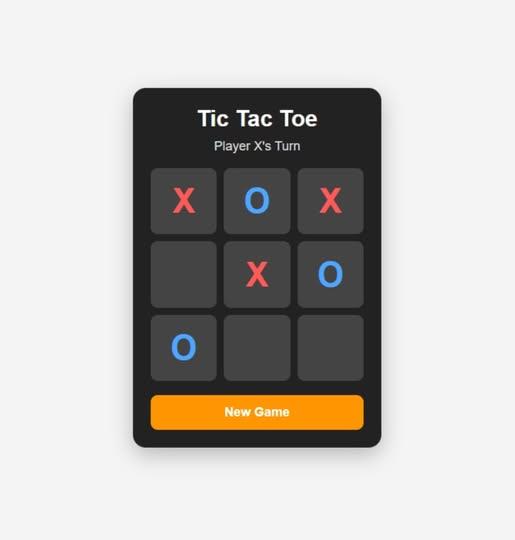
    Built a fully working Tic Tac Toe game using HTML, CSS, and JavaScript.
    The game includes player turns, win/draw detection, winning highlights, and a restart button.
    I used ChatGPT for vibe coding — generated the code with AI, tested it, and learned how the HTML, CSS, and JavaScript work together.
    Another task completed!
    #TicTacToe #VibeCoding #ChatGPT #HTML #CSS #JavaScript #Coding #WebDevelopment #LearningToCode #BuildInPublic
    RSIF8 Roll no: 99 Coding task no: 2 Coding topic: Create a Tic-Tac-Toe Game Built a fully working Tic Tac Toe game using HTML, CSS, and JavaScript. The game includes player turns, win/draw detection, winning highlights, and a restart button. I used ChatGPT for vibe coding 🤖💻 — generated the code with AI, tested it, and learned how the HTML, CSS, and JavaScript work together. Another task completed! ✅🚀 #TicTacToe #VibeCoding #ChatGPT #HTML #CSS #JavaScript #Coding #WebDevelopment #LearningToCode #BuildInPublic
    0 Comentários 0 Compartilhamentos 514 Visualizações
  • RSIF8
    Roll no: 99
    Coding task no: 1
    Coding topic Create a Basic Calculator
    Today’s task was to build a functional calculator that can perform basic mathematical operations such as:
    Addition
    Subtraction
    Multiplication
    Division
    I built the calculator using HTML, CSS, and JavaScript, with a proper interactive interface where users can enter numbers and perform calculations.
    But here’s the interesting part: I didn’t write all the code from scratch myself. Instead, I used ChatGPT for vibe coding — I described what I wanted, worked with the generated code, tested it, and made sure the final calculator actually worked.
    This task taught me that coding isn’t only about writing every line manually. It’s also about understanding the problem, communicating your idea clearly, testing the result, debugging, and learning from the code.
    One more small project completed!
    One more step forward in my learning journey.
    #VibeCoding #ChatGPT #HTML #CSS #JavaScript #WebDevelopment #Coding #Programming #Calculator #100DaysOfCode #LearningToCode #BuildInPublic #TechJourney #WebDesign #FrontendDevelopment #CodingJourney #AI #ArtificialIntelligence #Developer #StudentDeveloper
    RSIF8 Roll no: 99 Coding task no: 1 Coding topic Create a Basic Calculator Today’s task was to build a functional calculator that can perform basic mathematical operations such as: ➕ Addition ➖ Subtraction ✖️ Multiplication ➗ Division I built the calculator using HTML, CSS, and JavaScript, with a proper interactive interface where users can enter numbers and perform calculations. But here’s the interesting part: I didn’t write all the code from scratch myself. Instead, I used ChatGPT for vibe coding 🤖💻 — I described what I wanted, worked with the generated code, tested it, and made sure the final calculator actually worked. This task taught me that coding isn’t only about writing every line manually. It’s also about understanding the problem, communicating your idea clearly, testing the result, debugging, and learning from the code. One more small project completed! ✅ One more step forward in my learning journey. 📚🚀 #VibeCoding #ChatGPT #HTML #CSS #JavaScript #WebDevelopment #Coding #Programming #Calculator #100DaysOfCode #LearningToCode #BuildInPublic #TechJourney #WebDesign #FrontendDevelopment #CodingJourney #AI #ArtificialIntelligence #Developer #StudentDeveloper
    0 Comentários 0 Compartilhamentos 969 Visualizações
  • #rsisb
    Roll no.239
    Coding task no.13
    Foundation Level


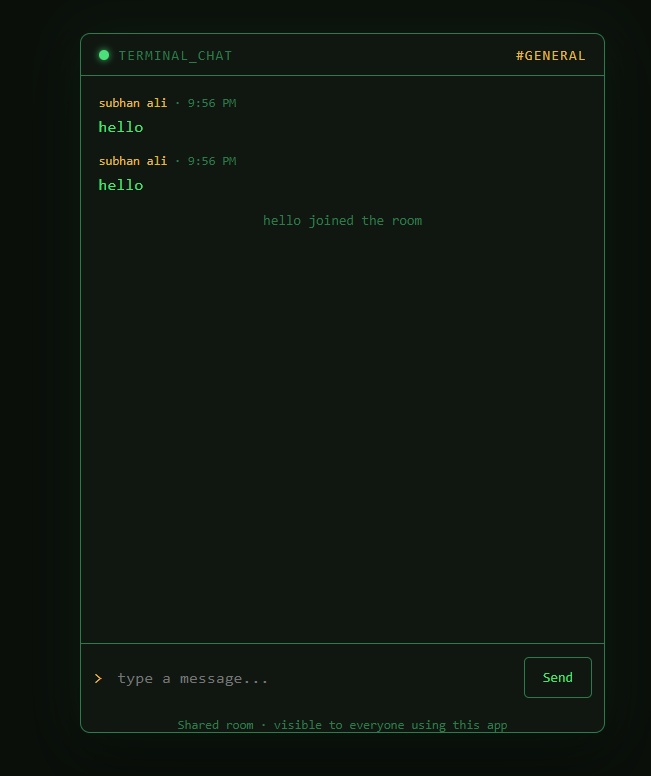
    A **Simple Chat Application** is a basic software project that allows two or more users to communicate by sending and receiving messages in real time.

    It is a great project for learning important programming concepts such as **user interfaces, networking, databases, and real-time communication**.

    ### Key Features

    * Send and receive messages
    * User login or username system
    * Online/offline status
    * Message timestamps
    * Notifications
    * Chat history

    ### Technologies You Can Use

    * **HTML, CSS & JavaScript** for the frontend
    * **Node.js** for the backend
    * **Socket.IO** for real-time messaging
    * **Firebase** for authentication and database services

    Building a simple chat application is an excellent way to understand how modern messaging platforms work. Start small, learn the basics, and gradually add more advanced features!

    #ChatApplication #WebDevelopment #Programming #JavaScript #NodeJS #SocketIO #Coding #Developer #TechProject #LearnToCode
    #rsisb Roll no.239 Coding task no.13 Foundation Level A **Simple Chat Application** is a basic software project that allows two or more users to communicate by sending and receiving messages in real time. 📱💻 It is a great project for learning important programming concepts such as **user interfaces, networking, databases, and real-time communication**. ### ✨ Key Features * 💬 Send and receive messages * 👤 User login or username system * 🟢 Online/offline status * 📅 Message timestamps * 🔔 Notifications * 🗂️ Chat history ### 🛠️ Technologies You Can Use * **HTML, CSS & JavaScript** for the frontend * **Node.js** for the backend * **Socket.IO** for real-time messaging * **Firebase** for authentication and database services Building a simple chat application is an excellent way to understand how modern messaging platforms work. 🚀 Start small, learn the basics, and gradually add more advanced features! #ChatApplication #WebDevelopment #Programming #JavaScript #NodeJS #SocketIO #Coding #Developer #TechProject #LearnToCode 💻🚀
    0 Comentários 0 Compartilhamentos 1501 Visualizações
  • #rsisb
    Roll no.239
    Coding task no.15
    Foundation Level

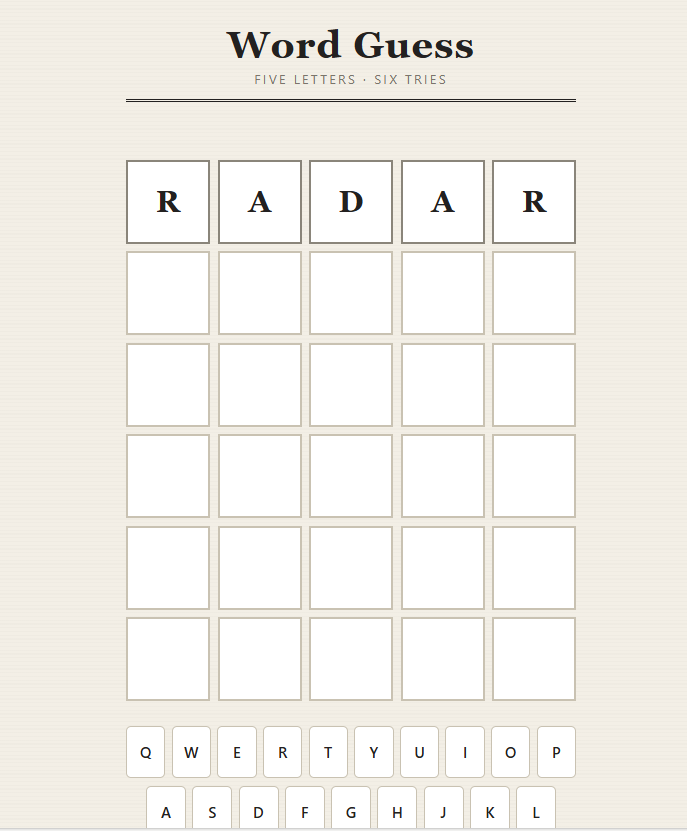
    Challenge your mind and test your vocabulary with an exciting **Word Guessing Game!** Guess the hidden word by using clues, thinking carefully, and making smart choices.

    This fun and interactive game is a great way to improve **vocabulary, spelling, memory, concentration, and problem-solving skills**. Every guess brings you one step closer to discovering the secret word!

    Whether you're playing with friends , practicing English , or building your coding skills through a simple game project , word guessing is an entertaining way to learn while having fun.

    **Think smart. Guess carefully. Discover the word!**

    #WordGuessingGame #WordGame #GuessTheWord #Vocabulary #EnglishVocabulary #LearningEnglish #EnglishGame #BrainGame #MindGame #PuzzleGame #FunLearning #EducationalGame #GameDevelopment #Coding #Programming #Python #JavaScript #HTML #CSS #CodingProject #BeginnerCoding #ComputerScience #Students #StudentProject #LearnToCode #ProgrammingForBeginners #ProblemSolving #CriticalThinking #BrainTraining #MemoryGame #Spelling #LanguageLearning #InteractiveGame #FunGame #GameChallenge #TechEducation #STEM #Education #Learning #Knowledge #CreativeCoding #CodingForStudents #BuildGames #GameProject #DigitalLearning #SmartLearning #LearnAndPlay #ChallengeYourMind
    #rsisb Roll no.239 Coding task no.15 Foundation Level Challenge your mind and test your vocabulary with an exciting **Word Guessing Game!** 🎯📚 Guess the hidden word by using clues, thinking carefully, and making smart choices. 💡🔍 This fun and interactive game is a great way to improve **vocabulary, spelling, memory, concentration, and problem-solving skills**. 🧠✍️📖 Every guess brings you one step closer to discovering the secret word! 🔐🔤 Whether you're playing with friends 👥, practicing English 🇬🇧, or building your coding skills through a simple game project 💻, word guessing is an entertaining way to learn while having fun. 🚀🎮 🔥 **Think smart. Guess carefully. Discover the word!** 🏆✨ #WordGuessingG🙃ame #WordGame #GuessTheWord #Vocabulary #EnglishVocabulary #LearningEnglish #EnglishGame #BrainGame #MindGame #PuzzleGame #FunLearning #EducationalGame #GameDevelopment #Coding #Programming #Python #JavaScript #HTML #CSS #CodingProject #BeginnerCoding #ComputerScience #Students #StudentProject #LearnToCode #ProgrammingForBeginners #ProblemSolving #CriticalThinking #BrainTraining #MemoryGame #Spelling #LanguageLearning #InteractiveGame #FunGame #GameChallenge #TechEducation #STEM #Education #Learning #Knowledge #CreativeCoding #CodingForStudents #BuildGames #GameProject #DigitalLearning #SmartLearning #LearnAndPlay #ChallengeYourMind 🎮🧠🔤💻🚀🏆✨
    0 Comentários 0 Compartilhamentos 5190 Visualizações
  • RSISB
    Roll No:#209
    Clone No.1


    WhatsApp Clone (Non-Functional)

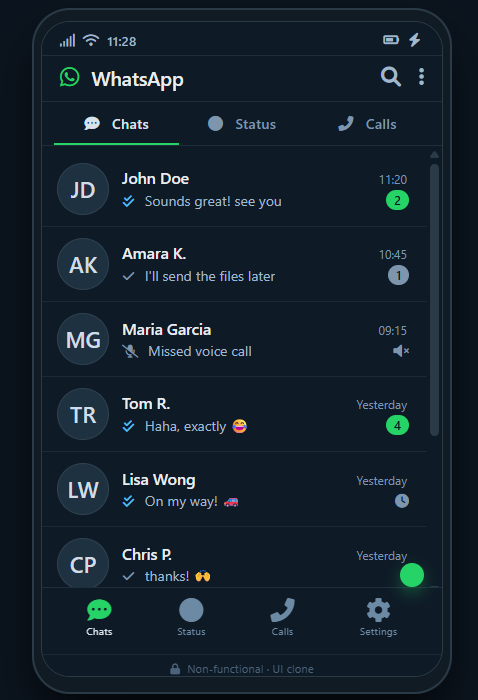
    A creative WhatsApp Clone project designed to recreate the look and feel of a modern messaging application. This non-functional clone focuses on UI design, layout, and visual elements, including chat screens, contact lists, message bubbles, profile sections, and a familiar messaging interface.

    The project is perfect for practicing frontend development, UI/UX design, responsive layouts, and web development skills. Although it is non-functional and does not send real messages, it demonstrates how a popular messaging platform can be recreated for learning and design purposes.

    A great project to showcase creativity, coding skills, and modern interface design!

    #WhatsAppClone #NonFunctional #WebDevelopment #FrontendDevelopment #UIDesign #UXDesign #WebDesign #Coding #Programming #HTML #CSS #JavaScript #ResponsiveDesign #FrontendProject #CodingProject #Developer #Learning #Tech #SoftwareDevelopment #PortfolioProject
    RSISB Roll No:#209 Clone No.1 📱💬 WhatsApp Clone (Non-Functional) 💬📱 A creative WhatsApp Clone project designed to recreate the look and feel of a modern messaging application. 🎨✨ This non-functional clone focuses on UI design, layout, and visual elements, including chat screens, contact lists, message bubbles, profile sections, and a familiar messaging interface. 💚🗨️ The project is perfect for practicing frontend development, UI/UX design, responsive layouts, and web development skills. 💻🚀 Although it is non-functional and does not send real messages, it demonstrates how a popular messaging platform can be recreated for learning and design purposes. 🌟📚 💡 A great project to showcase creativity, coding skills, and modern interface design! 🔥👨‍💻 #WhatsAppClone #NonFunctional #WebDevelopment #FrontendDevelopment #UIDesign #UXDesign #WebDesign #Coding #Programming #HTML #CSS #JavaScript #ResponsiveDesign #FrontendProject #CodingProject #Developer #Learning #Tech #SoftwareDevelopment #PortfolioProject 📱💬💻🎨✨🚀🧑‍💻🌟🔥📚💚
    0 Comentários 0 Compartilhamentos 3373 Visualizações
  • #rsisb
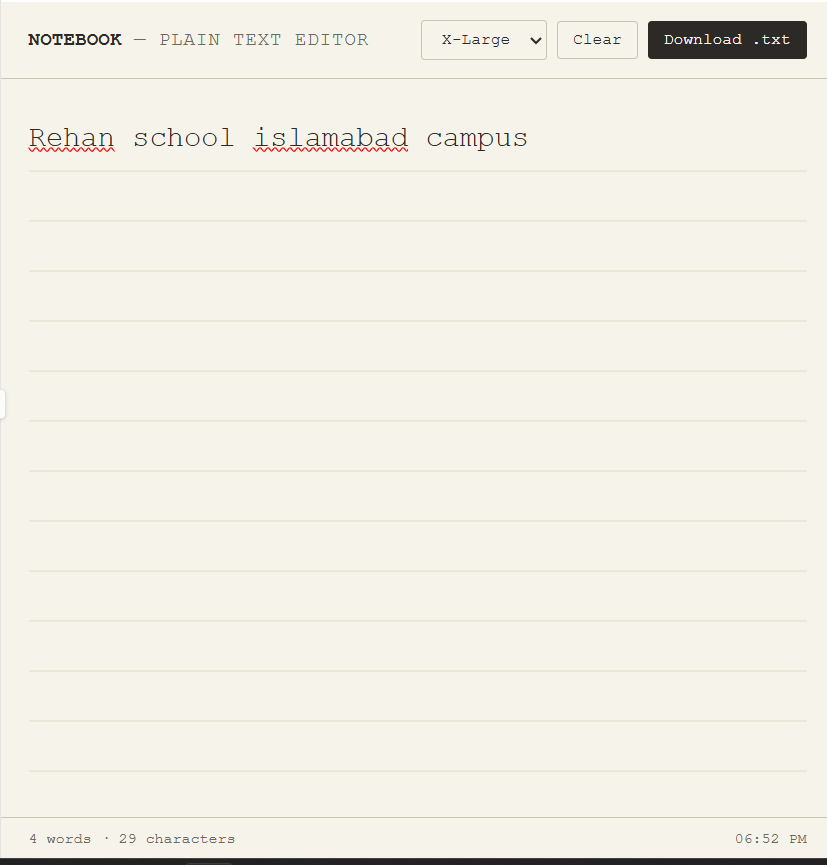
    Roll no.239
    Coding task no.36
    Foundation Level

    A **Basic Text Editor** is a simple computer application designed for creating, viewing, and editing plain text. It provides users with a straightforward space where they can type notes, write documents, edit code, or store important information without complicated formatting tools.

    A basic text editor usually includes essential features such as **creating a new file, opening an existing file, editing text, saving files, and closing documents**. Some simple editors may also provide functions such as copy, cut, paste, undo, redo, find, and replace.

    Text editors are especially useful for students and beginners because they are easy to understand and operate. They can also be helpful for programmers who need to write and edit HTML, CSS, JavaScript, Python, or other programming files.

    The main purpose of a basic text editor is to make text editing **simple, fast, and accessible**. Unlike advanced word processors, it generally focuses on plain text rather than complex formatting, images, tables, and page layouts.

    Overall, a Basic Text Editor is an excellent beginner-friendly project for learning programming and GUI development. It teaches important concepts such as **file handling, user interfaces, text manipulation, buttons, menus, and saving data**.
    #rsisb Roll no.239 Coding task no.36 Foundation Level A **Basic Text Editor** is a simple computer application designed for creating, viewing, and editing plain text. It provides users with a straightforward space where they can type notes, write documents, edit code, or store important information without complicated formatting tools. A basic text editor usually includes essential features such as **creating a new file, opening an existing file, editing text, saving files, and closing documents**. Some simple editors may also provide functions such as copy, cut, paste, undo, redo, find, and replace. Text editors are especially useful for students and beginners because they are easy to understand and operate. They can also be helpful for programmers who need to write and edit HTML, CSS, JavaScript, Python, or other programming files. The main purpose of a basic text editor is to make text editing **simple, fast, and accessible**. Unlike advanced word processors, it generally focuses on plain text rather than complex formatting, images, tables, and page layouts. Overall, a Basic Text Editor is an excellent beginner-friendly project for learning programming and GUI development. It teaches important concepts such as **file handling, user interfaces, text manipulation, buttons, menus, and saving data**.
    0 Comentários 0 Compartilhamentos 1621 Visualizações
  • #rsisb
    Roll No.240
    Coding Task No.3
    Foundation Level

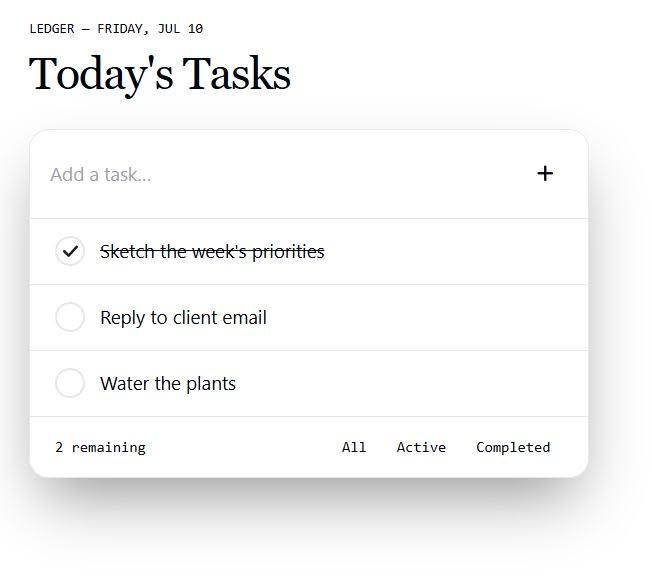
    **Simple To-Do List App**

    Stay organized, boost your productivity, and never miss an important task! This simple and easy-to-use To-Do List App helps you manage your daily goals, keep track of your progress, and make every day more productive.

    Whether it's work, study, or personal tasks, this app keeps everything in one place.

    Start planning today and turn your goals into achievements!

    #ToDoList #Productivity #TaskManager #Coding #WebDevelopment #JavaScript #HTML #CSS #Programming #Developer #AppDevelopment #LearnToCode #Tech #CodingProject #DailyTasks #OrganizedLife

    Rehan School Islamabad Campus
    Asma Shaheen EducationWali
    Irum Asim
    Saima Happinesswali

    #rsisb Roll No.240 Coding Task No.3 Foundation Level 📝 **Simple To-Do List App** ✅ Stay organized, boost your productivity, and never miss an important task! 🚀 This simple and easy-to-use To-Do List App helps you manage your daily goals, keep track of your progress, and make every day more productive. Whether it's work, study, or personal tasks, this app keeps everything in one place. 💙✨ 📌 Start planning today and turn your goals into achievements! 🌟 #ToDoList #Productivity #TaskManager #Coding #WebDevelopment #JavaScript #HTML #CSS #Programming #Developer #AppDevelopment #LearnToCode #Tech #CodingProject #DailyTasks #OrganizedLife 🚀💻📋 Rehan School Islamabad Campus Asma Shaheen EducationWali Irum Asim Saima Happinesswali
    0 Comentários 0 Compartilhamentos 2736 Visualizações
  • Simple Calculator Web App using Gemini CLI
    Description

    A simple and responsive calculator web application developed using Gemini CLI. The calculator performs Addition, Subtraction, Multiplication, and Division with a clean, modern, and user-friendly interface.

    Student Information

    Coding Book: 1
    Task: 1
    Roll No: 71

    Website Link

    http://rsmc71.rehanschool.us/calculator/

    Hashtags

    #GeminiCLI #CalculatorApp #WebDevelopment #HTML #CSS #JavaScript #CodingBook1 #Task1 #RollNo71 #Programming #FrontendDevelopment #AI #StudentProject #CodeWithAI #TechEducation
    Simple Calculator Web App using Gemini CLI Description A simple and responsive calculator web application developed using Gemini CLI. The calculator performs Addition, Subtraction, Multiplication, and Division with a clean, modern, and user-friendly interface. Student Information 📖 Coding Book: 1 📋 Task: 1 🎓 Roll No: 71 Website Link http://rsmc71.rehanschool.us/calculator/ Hashtags #GeminiCLI #CalculatorApp #WebDevelopment #HTML #CSS #JavaScript #CodingBook1 #Task1 #RollNo71 #Programming #FrontendDevelopment #AI #StudentProject #CodeWithAI #TechEducation
    0 Comentários 0 Compartilhamentos 4545 Visualizações
  • Tic Tac Toe Web App using Gemini CLI
    Description

    A modern and interactive Tic Tac Toe web application developed using Gemini CLI. The game allows two players to compete on a 3x3 board, automatically detects winners and draws, maintains scores, and provides a responsive user experience across all devices.

    Student Information

    Coding Book: 1
    Task: 2
    Roll No: 71

    Website Link

    http://rsmc71.rehanschool.us/tictactoe/

    Hashtags

    #GeminiCLI #TicTacToe #WebDevelopment #HTML #CSS #JavaScript #CodingBook1 #Task2 #RollNo71 #Programming #FrontendDevelopment #GameDevelopment #AI #StudentProject #CodeWithAI #TechEducation
    Tic Tac Toe Web App using Gemini CLI Description A modern and interactive Tic Tac Toe web application developed using Gemini CLI. The game allows two players to compete on a 3x3 board, automatically detects winners and draws, maintains scores, and provides a responsive user experience across all devices. Student Information 📖 Coding Book: 1 📋 Task: 2 🎓 Roll No: 71 Website Link http://rsmc71.rehanschool.us/tictactoe/ Hashtags #GeminiCLI #TicTacToe #WebDevelopment #HTML #CSS #JavaScript #CodingBook1 #Task2 #RollNo71 #Programming #FrontendDevelopment #GameDevelopment #AI #StudentProject #CodeWithAI #TechEducation
    0 Comentários 0 Compartilhamentos 4966 Visualizações
Páginas Impulsionadas