• #rsisb
    Roll no 279
    codig task no 4
    Foundtion level

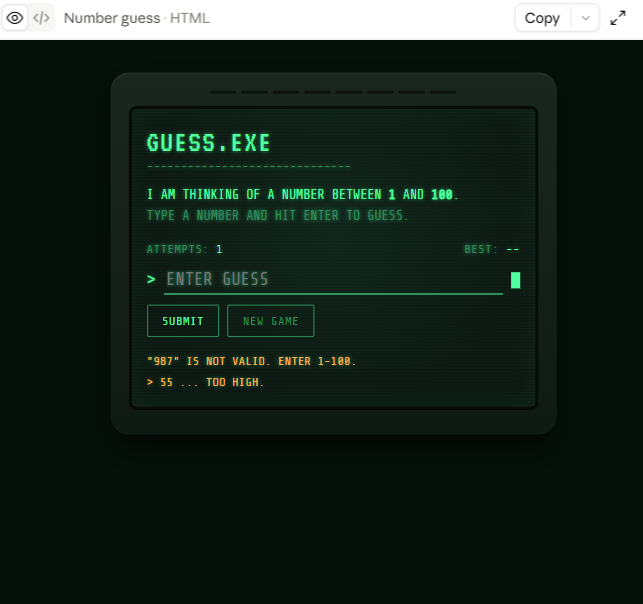
    Get ready for a fun and exciting **Number Guessing Game**! In this interactive game, the computer secretly chooses a random number between **1 and 100**, and your challenge is to guess the correct number.
    Enter your guess and see if you can find the hidden number! After every attempt, the game gives you a helpful clue. If your guess is too high , you’ll be told to try a smaller number. If it’s too low , you’ll know to guess higher. Keep using the clues and improve your strategy with every attempt!
    **Challenge yourself to find the number in as few attempts as possible!** The game can help you practice logical thinking, problem-solving, decision-making, and basic programming concepts.
    **Key Features:**
    Random number generation
    Numbers from 1–100
    Helpful high/low hints
    New Game option
    Track your attempts
    Fun and interactive gameplay
    Beginner-friendly programming project
    This project is a great way to learn how games work while practicing **HTML, CSS, and JavaScript**. ‍ It combines a simple interface with interactive logic to create an enjoyable experience for players of all skill levels.
    Keep guessing, learn from every clue, and see how quickly you can become a **Number Guessing Champion!**
    #NumberGuessingGame #GuessTheNumber #Coding #Programming #JavaScript #HTML #CSS #WebDevelopment #CodingProject #BeginnerProject #LearnCoding #GameDevelopment #ProgrammingForBeginners #InteractiveGame #TechSkills #ProblemSolving
    Asma Shaheen EducationWali
    Saima Happinesswali
    Irum Asim See less
    #rsisb Roll no 279 codig task no 4 Foundtion level Get ready for a fun and exciting **Number Guessing Game**! ๐Ÿ•น๏ธโœจ In this interactive game, the computer secretly chooses a random number between **1 and 100**, and your challenge is to guess the correct number. ๐Ÿค”๐ŸŽฏ Enter your guess and see if you can find the hidden number! ๐Ÿ”๐Ÿ’ก After every attempt, the game gives you a helpful clue. If your guess is too high โฌ†๏ธ, you’ll be told to try a smaller number. If it’s too low โฌ‡๏ธ, you’ll know to guess higher. Keep using the clues and improve your strategy with every attempt! ๐Ÿง ๐Ÿš€ ๐Ÿ† **Challenge yourself to find the number in as few attempts as possible!** The game can help you practice logical thinking, problem-solving, decision-making, and basic programming concepts. ๐Ÿ’ป๐Ÿ“šโœจ ๐ŸŒŸ **Key Features:** ๐ŸŽฒ Random number generation ๐Ÿ”ข Numbers from 1–100 ๐Ÿ’ฌ Helpful high/low hints ๐Ÿ”„ New Game option ๐Ÿ… Track your attempts ๐ŸŽฏ Fun and interactive gameplay ๐Ÿ’ป Beginner-friendly programming project This project is a great way to learn how games work while practicing **HTML, CSS, and JavaScript**. ๐Ÿ‘จ‍๐Ÿ’ปโœจ It combines a simple interface with interactive logic to create an enjoyable experience for players of all skill levels. ๐ŸŽฎ๐Ÿ”ฅ Keep guessing, learn from every clue, and see how quickly you can become a **Number Guessing Champion!** ๐Ÿ†๐ŸŽฏ๐Ÿ’ช #NumberGuessingGame #GuessTheNumber #Coding #Programming #JavaScript #HTML #CSS #WebDevelopment #CodingProject #BeginnerProject #LearnCoding #GameDevelopment #ProgrammingForBeginners #InteractiveGame #TechSkills #ProblemSolving ๐ŸŽฎ๐Ÿ’ป๐Ÿ”ข๐Ÿš€โœจ Asma Shaheen EducationWali Saima Happinesswali Irum Asim See less
    0 Comments 0 Shares 1438 Views
  • #rsisb
    Roll no 279
    codig task no 3
    Foundtion level

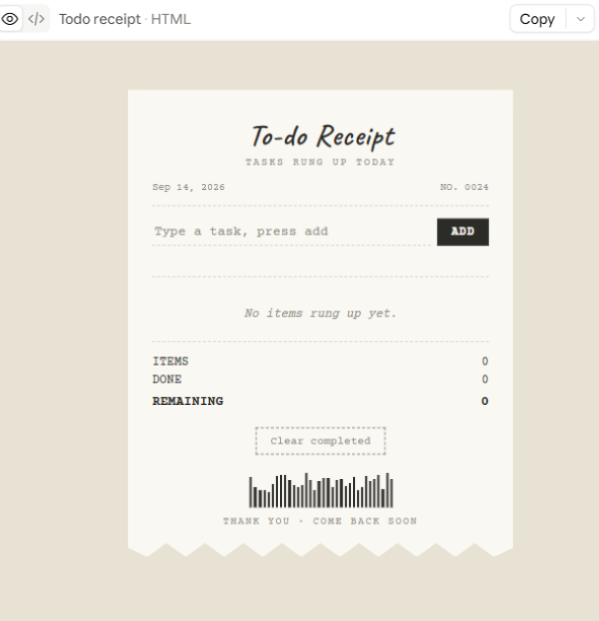
    **Simple To-Do List App**
    Stay organized and manage your daily tasks with this **Simple To-Do List App**! This beginner-friendly project helps users add tasks, keep track of important work, and mark tasks as completed.
    Whether you want to remember your homework , plan your daily activities , or organize your personal goals , a To-Do List makes everything easier and more manageable.
    **Key Features:**
    Add new tasks
    Manage your tasks
    Mark tasks as completed
    Remove completed or unwanted tasks
    Keep your daily work organized
    This project is a great way to practice **programming, problem-solving, and basic app development skills**. ‍‍
    Keep learning, keep building, and turn your ideas into useful projects!
    #ToDoList #ToDoApp #Programming #Coding #AppDevelopment #BeginnerProject #LearnCoding #TechSkills #DailyTasks #Productivity #CodingProject #ProgrammingForBeginners
    Asma Shaheen EducationWali
    Saima Happinesswali
    Irum Asim
    #rsisb Roll no 279 codig task no 3 Foundtion level ๐Ÿ“โœจ **Simple To-Do List App** โœจ๐Ÿ“ Stay organized and manage your daily tasks with this **Simple To-Do List App**! โœ…๐Ÿ“‹ This beginner-friendly project helps users add tasks, keep track of important work, and mark tasks as completed. ๐ŸŽฏ๐Ÿ’ป Whether you want to remember your homework ๐Ÿ“š, plan your daily activities ๐Ÿ—“๏ธ, or organize your personal goals ๐ŸŒŸ, a To-Do List makes everything easier and more manageable. ๐Ÿš€ **Key Features:** โœ… Add new tasks โœ๏ธ Manage your tasks โ˜‘๏ธ Mark tasks as completed ๐Ÿ—‘๏ธ Remove completed or unwanted tasks ๐Ÿ“‹ Keep your daily work organized This project is a great way to practice **programming, problem-solving, and basic app development skills**. ๐Ÿ’ก๐Ÿ‘จ‍๐Ÿ’ป๐Ÿ‘ฉ‍๐Ÿ’ป Keep learning, keep building, and turn your ideas into useful projects! ๐ŸŒŸ๐Ÿ”ฅ #ToDoList #ToDoApp #Programming #Coding #AppDevelopment #BeginnerProject #LearnCoding #TechSkills #DailyTasks #Productivity #CodingProject #ProgrammingForBeginners ๐Ÿš€๐Ÿ’ป๐Ÿ“โœจ Asma Shaheen EducationWali Saima Happinesswali Irum Asim
    0 Comments 0 Shares 947 Views
  • #rsisb
    Roll no 279
    codig task no 1
    Foundtion level

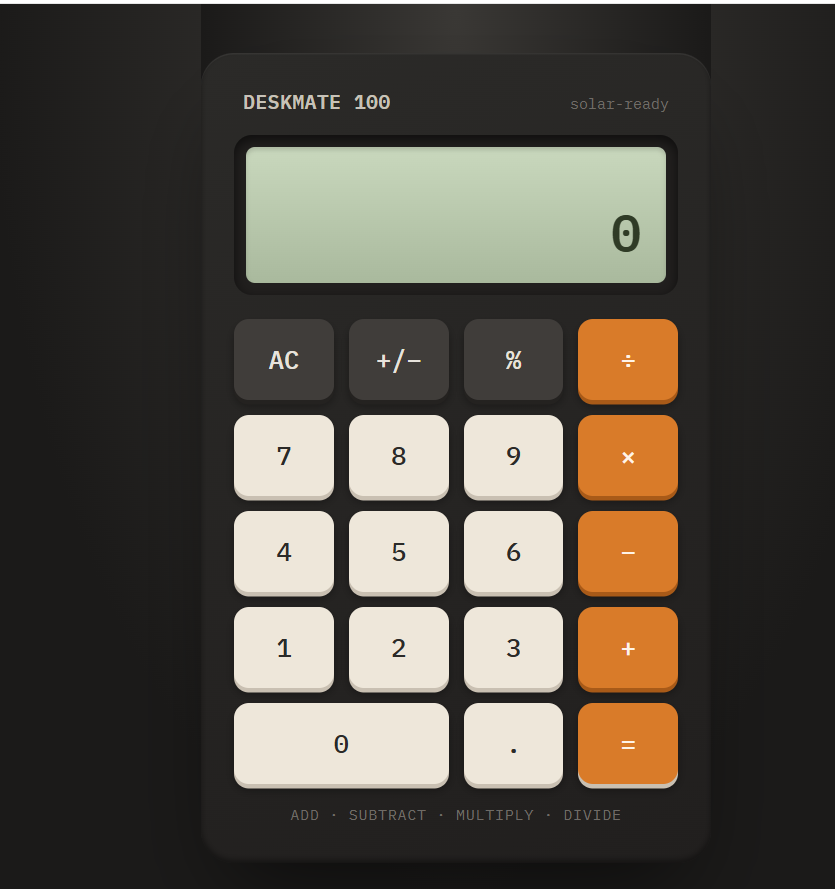
    In this activity, you will learn how to create a simple and useful **Basic Calculator**. A calculator helps users perform common mathematical operations quickly and easily, such as **addition (+), subtraction (−), multiplication (×), and division (÷)**.
    The goal of this project is to understand how a calculator works and how buttons, numbers, and mathematical operations can be connected together. You will also learn how to create a simple user-friendly interface where users can enter numbers, select an operation, and see the final result.
    **What You Will Learn:**
    • How to create a calculator interface
    • How to use number and operation buttons
    • How to perform basic mathematical calculations
    • How to display results clearly
    • How to make a simple and easy-to-use calculator
    This project is a great beginner-friendly activity for learning **logic, problem-solving, programming, and basic user-interface design**.
    #BasicCalculator #Calculator #Programming #Coding #LearnCoding #BeginnerProject #Math #Technology #ComputerSkills #ProgrammingForBeginners #Learning #Education #CodingProject #DigitalSkills #ComputerScience
    Saima Happinesswali
    Irum Asim
    Asma Shaheen EducationWali
    #rsisb Roll no 279 codig task no 1 Foundtion level In this activity, you will learn how to create a simple and useful **Basic Calculator**. A calculator helps users perform common mathematical operations quickly and easily, such as **addition (+), subtraction (−), multiplication (×), and division (÷)**. The goal of this project is to understand how a calculator works and how buttons, numbers, and mathematical operations can be connected together. You will also learn how to create a simple user-friendly interface where users can enter numbers, select an operation, and see the final result. ๐Ÿ’ก **What You Will Learn:** • How to create a calculator interface • How to use number and operation buttons • How to perform basic mathematical calculations • How to display results clearly • How to make a simple and easy-to-use calculator This project is a great beginner-friendly activity for learning **logic, problem-solving, programming, and basic user-interface design**. ๐Ÿš€๐Ÿ’ป #BasicCalculator #Calculator #Programming #Coding #LearnCoding #BeginnerProject #Math #Technology #ComputerSkills #ProgrammingForBeginners #Learning #Education #CodingProject #DigitalSkills #ComputerScience ๐Ÿงฎ๐Ÿ’ป๐Ÿ“š๐Ÿš€ Saima Happinesswali Irum Asim Asma Shaheen EducationWali
    0 Comments 0 Shares 1380 Views
  • RSIF8
    Roll No: 112
    Coding Post No:1
    Coding Post Topic: Basic Calculator
    ### My Basic Calculator Project
    I created a **Basic Calculator** that performs four fundamental mathematical operations: **Addition , Subtraction , Multiplication , and Division **.
    The purpose of this project was to practice programming concepts by creating a simple and useful calculator. Through this activity, I learned how to take input, process calculations, use mathematical operators, and display the correct result to the user.
    The calculator allows the user to enter numbers and select the required operation. It then performs the calculation and shows the result. This project helped me understand how programming can be used to solve everyday problems in a simple and efficient way.
    ### Operations Included
    **Addition:** Adds two numbers together.
    **Subtraction:** Finds the difference between two numbers.
    **Multiplication:** Multiplies two numbers.
    **Division:** Divides one number by another.
    Creating this calculator was a great learning experience because it helped me improve my understanding of **logic, operators, user input, calculations, and programming fundamentals**.
    I’m happy to share my project and continue improving my coding skills through more practical projects. Every small project is a step toward becoming a better programmer! ‍
    **I have also shared a screenshot of my Basic Calculator to show the project and its working.**
    ### What I Learned
    How to perform basic mathematical operations
    How to use programming operators
    How to work with user input
    How to apply logic in a simple program
    How to create a useful beginner-level project
    How practical projects can improve programming skills
    Thank you for viewing my project!
    I’m looking forward to learning more, creating new projects, and improving my technical skills.
    ### Hashtags
    #BasicCalculator #CalculatorProject #Programming #Coding #CodingJourney #LearnToCode #ProgrammingForBeginners #StudentProject #CodingSkills #TechSkills #ComputerScience #ProgrammingProject #BeginnerProject #LearningProgramming #PracticalLearning #DigitalSkills #FutureProgrammer #RSIF8 #StudentLearning #KeepLearning #LearnAndGrow
    ‍
    RSIF8 Roll No: 112 Coding Post No:1 Coding Post Topic: Basic Calculator ### ๐Ÿงฎ๐Ÿ’ป My Basic Calculator Project I created a **Basic Calculator** that performs four fundamental mathematical operations: **Addition โž•, Subtraction โž–, Multiplication โœ–๏ธ, and Division โž—**. The purpose of this project was to practice programming concepts by creating a simple and useful calculator. Through this activity, I learned how to take input, process calculations, use mathematical operators, and display the correct result to the user. ๐Ÿ’ป๐Ÿ“šโœจ The calculator allows the user to enter numbers and select the required operation. It then performs the calculation and shows the result. This project helped me understand how programming can be used to solve everyday problems in a simple and efficient way. ๐Ÿš€๐Ÿง  ### ๐Ÿ”ข Operations Included โž• **Addition:** Adds two numbers together. โž– **Subtraction:** Finds the difference between two numbers. โœ–๏ธ **Multiplication:** Multiplies two numbers. โž— **Division:** Divides one number by another. Creating this calculator was a great learning experience because it helped me improve my understanding of **logic, operators, user input, calculations, and programming fundamentals**. ๐ŸŒŸ๐Ÿ’ก I’m happy to share my project and continue improving my coding skills through more practical projects. Every small project is a step toward becoming a better programmer! ๐Ÿ‘ฉ‍๐Ÿ’ป๐Ÿš€๐Ÿ“– ๐Ÿ“ธ **I have also shared a screenshot of my Basic Calculator to show the project and its working.** ### ๐ŸŒŸ What I Learned โœ… How to perform basic mathematical operations โœ… How to use programming operators โœ… How to work with user input โœ… How to apply logic in a simple program โœ… How to create a useful beginner-level project โœ… How practical projects can improve programming skills Thank you for viewing my project! ๐Ÿ™Œโœจ I’m looking forward to learning more, creating new projects, and improving my technical skills. ๐Ÿ’ป๐ŸŒฑ๐Ÿš€ ### ๐Ÿ”– Hashtags #BasicCalculator #CalculatorProject #Programming #Coding #CodingJourney #LearnToCode #ProgrammingForBeginners #StudentProject #CodingSkills #TechSkills #ComputerScience #ProgrammingProject #BeginnerProject #LearningProgramming #PracticalLearning #DigitalSkills #FutureProgrammer #RSIF8 #StudentLearning #KeepLearning #LearnAndGrow ๐Ÿงฎ โž• โž– โœ–๏ธ โž— ๐Ÿ’ป ๐Ÿ‘ฉ‍๐Ÿ’ป ๐Ÿ“š ๐Ÿง  ๐Ÿ’ก ๐ŸŒŸ ๐Ÿš€ ๐ŸŽฏ โœจ๐Ÿ™Œ
    0 Comments 0 Shares 2065 Views
  • #rsisb
    Roll no.239
    Coding task no.15
    Foundation Level

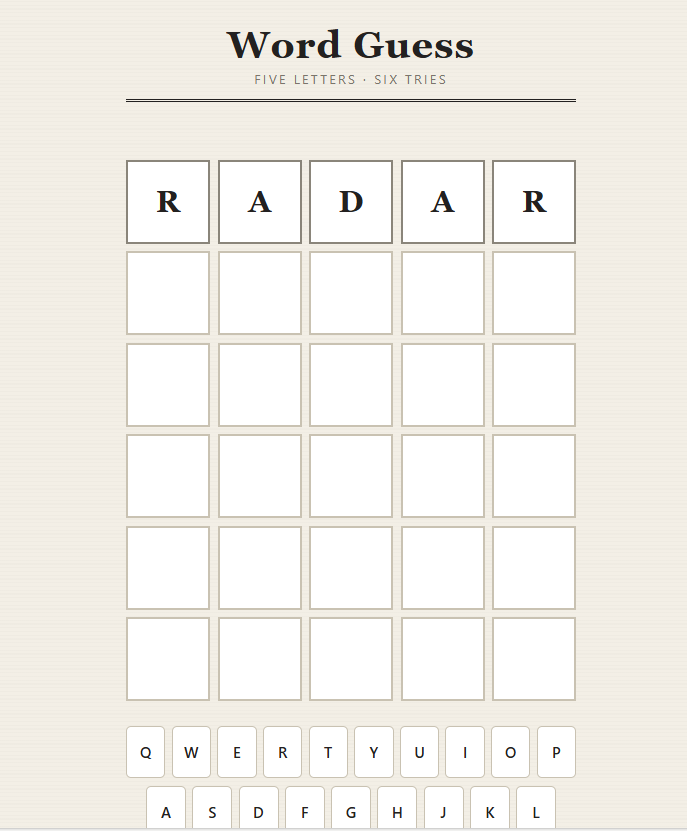
    Challenge your mind and test your vocabulary with an exciting **Word Guessing Game!** Guess the hidden word by using clues, thinking carefully, and making smart choices.

    This fun and interactive game is a great way to improve **vocabulary, spelling, memory, concentration, and problem-solving skills**. Every guess brings you one step closer to discovering the secret word!

    Whether you're playing with friends , practicing English , or building your coding skills through a simple game project , word guessing is an entertaining way to learn while having fun.

    **Think smart. Guess carefully. Discover the word!**

    #WordGuessingGame #WordGame #GuessTheWord #Vocabulary #EnglishVocabulary #LearningEnglish #EnglishGame #BrainGame #MindGame #PuzzleGame #FunLearning #EducationalGame #GameDevelopment #Coding #Programming #Python #JavaScript #HTML #CSS #CodingProject #BeginnerCoding #ComputerScience #Students #StudentProject #LearnToCode #ProgrammingForBeginners #ProblemSolving #CriticalThinking #BrainTraining #MemoryGame #Spelling #LanguageLearning #InteractiveGame #FunGame #GameChallenge #TechEducation #STEM #Education #Learning #Knowledge #CreativeCoding #CodingForStudents #BuildGames #GameProject #DigitalLearning #SmartLearning #LearnAndPlay #ChallengeYourMind
    #rsisb Roll no.239 Coding task no.15 Foundation Level Challenge your mind and test your vocabulary with an exciting **Word Guessing Game!** ๐ŸŽฏ๐Ÿ“š Guess the hidden word by using clues, thinking carefully, and making smart choices. ๐Ÿ’ก๐Ÿ” This fun and interactive game is a great way to improve **vocabulary, spelling, memory, concentration, and problem-solving skills**. ๐Ÿง โœ๏ธ๐Ÿ“– Every guess brings you one step closer to discovering the secret word! ๐Ÿ”๐Ÿ”ค Whether you're playing with friends ๐Ÿ‘ฅ, practicing English ๐Ÿ‡ฌ๐Ÿ‡ง, or building your coding skills through a simple game project ๐Ÿ’ป, word guessing is an entertaining way to learn while having fun. ๐Ÿš€๐ŸŽฎ ๐Ÿ”ฅ **Think smart. Guess carefully. Discover the word!** ๐Ÿ†โœจ #WordGuessingG๐Ÿ™ƒame #WordGame #GuessTheWord #Vocabulary #EnglishVocabulary #LearningEnglish #EnglishGame #BrainGame #MindGame #PuzzleGame #FunLearning #EducationalGame #GameDevelopment #Coding #Programming #Python #JavaScript #HTML #CSS #CodingProject #BeginnerCoding #ComputerScience #Students #StudentProject #LearnToCode #ProgrammingForBeginners #ProblemSolving #CriticalThinking #BrainTraining #MemoryGame #Spelling #LanguageLearning #InteractiveGame #FunGame #GameChallenge #TechEducation #STEM #Education #Learning #Knowledge #CreativeCoding #CodingForStudents #BuildGames #GameProject #DigitalLearning #SmartLearning #LearnAndPlay #ChallengeYourMind ๐ŸŽฎ๐Ÿง ๐Ÿ”ค๐Ÿ’ป๐Ÿš€๐Ÿ†โœจ
    0 Comments 0 Shares 9325 Views
  • #rsisb
    Roll no.247
    Foundation level# Basic Calculator with GUI

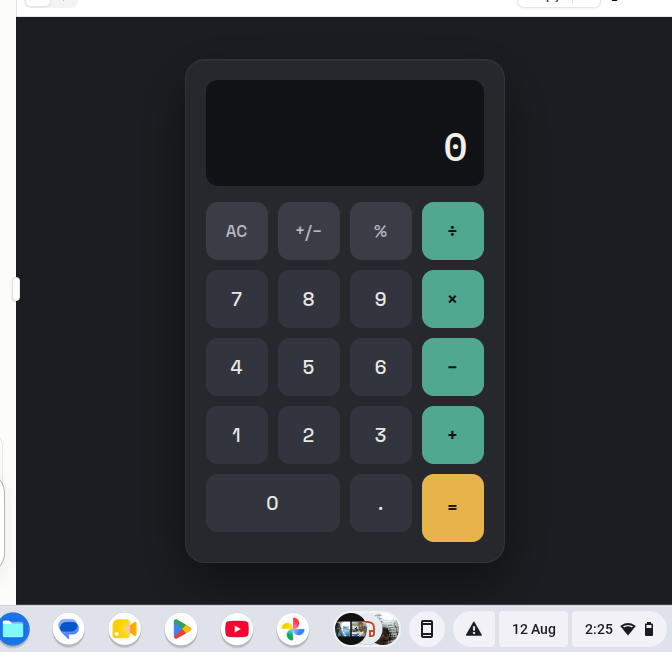
    Welcome to **Basic Calculator with GUI** — a simple, user-friendly, and interactive calculator project designed to make everyday mathematical calculations quick, easy, and enjoyable! This project demonstrates how a calculator can be built with a **Graphical User Interface (GUI)**, allowing users to perform calculations by simply clicking buttons instead of typing commands.

    The calculator provides essential mathematical operations such as **addition , subtraction , multiplication , and division **. It is designed with a clean and straightforward interface so that beginners, students, and anyone interested in programming can easily understand how a GUI-based application works. ‍‍

    One of the most interesting aspects of this project is the combination of **programming logic and visual design**. Users can enter numbers, select mathematical operators, and instantly see the result displayed on the calculator screen. This makes the project a great example of how programming can be used to create practical and interactive applications.

    The **Basic Calculator with GUI** is also an excellent learning project for students who are beginning their programming journey. Through this project, learners can understand important concepts such as **variables, functions, event handling, buttons, input fields, operators, conditional logic, and GUI components**. These concepts provide a strong foundation for developing more advanced software applications in the future.

    The simple design makes the calculator easy to navigate, while the interactive buttons provide a smooth user experience. Whether you want to calculate a total, subtract numbers, multiply values, or divide one number by another, this calculator provides the essential tools needed for basic arithmetic.

    This project also highlights the importance of creating applications that are not only functional but also **easy to use and visually understandable**. A well-designed GUI helps users interact with software naturally and makes complex programming concepts more accessible.

    Overall, the **Basic Calculator with GUI** is a fun, educational, and practical programming project. It is perfect for beginners who want to practice GUI development while building something useful. With additional features, the project can later be expanded into a more advanced calculator with percentage calculations, decimal support, square roots, memory functions, calculation history, and more!

    **Project Highlights:**
    Simple and clean GUI design
    Addition, subtraction, multiplication, and division
    Interactive calculator buttons
    Easy-to-understand interface
    Beginner-friendly programming project
    Useful for learning GUI development
    Great practice for programming logic
    Can be expanded with advanced features

    **Learn. Code. Calculate. Create!**

    #BasicCalculator #CalculatorGUI #GUICalculator #Programming #Coding #ComputerScience #PythonProject #BeginnerProject #ProgrammingForBeginners #GUIProgramming #SoftwareDevelopment #CodingProject #MathCalculator #LearnProgramming #StudentProject #TechProject #InteractiveApplication #ComputerProgramming #CodingJourney #ProgrammingSkills #Education #Technology #Developer #CodeLearning #CreativeCoding #Math #CalculatorProject
    #rsisb Roll no.247 Foundation level# Basic Calculator with GUI ๐Ÿงฎ๐Ÿ’ป Welcome to **Basic Calculator with GUI** — a simple, user-friendly, and interactive calculator project designed to make everyday mathematical calculations quick, easy, and enjoyable! ๐ŸŽ‰โœจ This project demonstrates how a calculator can be built with a **Graphical User Interface (GUI)**, allowing users to perform calculations by simply clicking buttons instead of typing commands. ๐Ÿ–ฑ๏ธ๐Ÿ”ข The calculator provides essential mathematical operations such as **addition โž•, subtraction โž–, multiplication โœ–๏ธ, and division โž—**. It is designed with a clean and straightforward interface so that beginners, students, and anyone interested in programming can easily understand how a GUI-based application works. ๐Ÿ’ก๐Ÿ‘จ‍๐Ÿ’ป๐Ÿ‘ฉ‍๐Ÿ’ป One of the most interesting aspects of this project is the combination of **programming logic and visual design**. ๐ŸŽจ๐Ÿ’ป Users can enter numbers, select mathematical operators, and instantly see the result displayed on the calculator screen. This makes the project a great example of how programming can be used to create practical and interactive applications. ๐Ÿš€ The **Basic Calculator with GUI** is also an excellent learning project for students who are beginning their programming journey. ๐Ÿ“š๐ŸŒŸ Through this project, learners can understand important concepts such as **variables, functions, event handling, buttons, input fields, operators, conditional logic, and GUI components**. These concepts provide a strong foundation for developing more advanced software applications in the future. ๐Ÿง ๐Ÿ’ป The simple design makes the calculator easy to navigate, while the interactive buttons provide a smooth user experience. ๐Ÿ”ข๐Ÿ–ฑ๏ธ Whether you want to calculate a total, subtract numbers, multiply values, or divide one number by another, this calculator provides the essential tools needed for basic arithmetic. โœ… This project also highlights the importance of creating applications that are not only functional but also **easy to use and visually understandable**. ๐ŸŒŸ A well-designed GUI helps users interact with software naturally and makes complex programming concepts more accessible. Overall, the **Basic Calculator with GUI** is a fun, educational, and practical programming project. ๐Ÿงฎโœจ It is perfect for beginners who want to practice GUI development while building something useful. With additional features, the project can later be expanded into a more advanced calculator with percentage calculations, decimal support, square roots, memory functions, calculation history, and more! ๐Ÿš€๐Ÿ”ข ๐ŸŽฏ **Project Highlights:** ๐Ÿ”น Simple and clean GUI design ๐Ÿ”น Addition, subtraction, multiplication, and division ๐Ÿ”น Interactive calculator buttons ๐Ÿ”น Easy-to-understand interface ๐Ÿ”น Beginner-friendly programming project ๐Ÿ”น Useful for learning GUI development ๐Ÿ”น Great practice for programming logic ๐Ÿ”น Can be expanded with advanced features ๐Ÿ’ป **Learn. Code. Calculate. Create!** ๐Ÿงฎ๐Ÿš€ #BasicCalculator #CalculatorGUI #GUICalculator #Programming #Coding #ComputerScience #PythonProject #BeginnerProject #ProgrammingForBeginners #GUIProgramming #SoftwareDevelopment #CodingProject #MathCalculator #LearnProgramming #StudentProject #TechProject #InteractiveApplication #ComputerProgramming #CodingJourney #ProgrammingSkills #Education #Technology #Developer #CodeLearning #CreativeCoding #Math #CalculatorProject ๐Ÿงฎ๐Ÿ’ป
    0 Comments 0 Shares 8321 Views